What is Video Processing PCB Design and Why is it Important?
Video processing PCB design involves creating specialized circuit boards that manage video signals, encompassing functions from input and processing to output. These boards are integral to devices such as cameras, video recorders, streaming equipment, and various display systems. Unlike general-purpose PCBs, video processing boards demand meticulous attention to high-speed signal integrity, efficient power management, and precise component selection to ensure reliable performance under stringent conditions.
For newcomers to the field, grasping the unique challenges of video PCB basics is crucial. Video signals often operate at extremely high frequencies, reaching several gigahertz for HD or 4K content. This necessitates careful layout planning to prevent signal degradation, reflections, or crosstalk. Furthermore, stable and clean power delivery is paramount to avoid interference with the sensitive analog and digital components that handle video data. The quality of a video processing PCB directly dictates the performance of the final product; a poorly designed board can lead to issues ranging from pixelated video and dropped frames to complete signal loss. By mastering the video PCB design steps, engineers can create robust boards essential for applications from consumer electronics to professional broadcasting equipment.

Fundamental Concepts of Video PCB Design for Beginners
Before delving into the practical design process, understanding the foundational video PCB basics is essential. These concepts illuminate the unique technical requirements inherent in video processing circuit boards.
High-Speed Signal Management
Video signals, particularly those for high-definition content, involve extremely high data rates. For instance, HDMI 2.0 supports data transfer speeds up to 18 Gigabits per second (Gbps). At such speeds, even minor layout imperfections can introduce signal reflections or crosstalk, degrading video quality. To manage this effectively, video PCBs frequently employ controlled impedance traces, typically designed for 50 ohms for single-ended signals and 100 ohms for differential pairs. This precise impedance matching between the signal source, the trace, and the load is critical for preventing signal degradation and ensuring clean data transmission.
Noise Reduction Strategies
Minimizing noise is a primary concern in video PCB design. Electromagnetic Interference (EMI) and Radio-Frequency Interference (RFI) can severely compromise video signal quality, leading to visual artifacts or complete signal loss. Designers combat noise through various techniques, including the extensive use of solid ground planes to provide a stable reference and shield against interference. Strategic component placement helps reduce noise coupling, while shielding (e.g., using metal enclosures or localized copper pours) can further protect sensitive areas.
Power Integrity Importance
Video processing integrated circuits (ICs), such as encoders, decoders, or scaling engines, demand exceptionally clean and stable power. Even minute voltage fluctuations, as small as 50 millivolts (mV), can introduce glitches or instability into the video output. To maintain robust power integrity, decoupling capacitors (commonly 0.1 μF and 1 μF) are strategically placed as close as possible to the power pins of these sensitive components. These capacitors act as local charge reservoirs, filtering out high-frequency noise and providing instantaneous current to the ICs, thus ensuring stable voltage delivery.

Step-by-Step Video PCB Design Tutorial
Armed with foundational knowledge, beginners can now embark on the practical video PCB design steps. This video PCB tutorial simplifies the process into manageable stages.
Defining Project Requirements and Component Selection
The initial stage involves clearly outlining the specific functions and specifications of your video processing PCB. This includes identifying the desired video resolution (e.g., 1080p or 4K), the required input/output interfaces (e.g., HDMI, USB-C, or analog composite), and the power requirements (e.g., 5V or 12V input). For example, if designing a basic video capture board, you might specify a USB 2.0 interface supporting 720p video at 30 frames per second.
Following requirements definition, select components that precisely match these needs. Key components for video processing typically include video processors (chips for encoding or decoding video streams), appropriate connectors (e.g., HDMI, DisplayPort, or RCA jacks), and power regulators to provide stable voltage to sensitive ICs. When choosing components for a beginner project, prioritize those with comprehensive datasheets and readily available application notes or reference designs.
Schematic Creation and PCB Layout Design
The schematic diagram serves as the electrical blueprint of your PCB, illustrating how all components are interconnected. Using suitable design software, meticulously draw the schematic, ensuring all essential connections for video signals, power, and ground are accurately represented. Pay particular attention to signal paths, keeping high-speed video lines as short and direct as possible to minimize delays and interference.
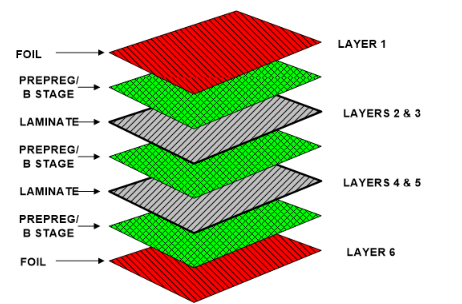
The PCB layout phase is arguably the most critical for video designs. Strategically place components by grouping related parts (e.g., the video processor close to its associated connectors) to minimize trace lengths. Route high-speed traces with extreme care, keeping them straight and avoiding sharp bends. For interfaces like HDMI, utilize differential pair routing to maintain signal integrity. A solid ground plane placed directly beneath high-speed traces is essential for reducing noise and EMI. Additionally, liberally distribute decoupling capacitors near component power pins to effectively filter out high-frequency noise. For controlled impedance, calculate trace widths based on the board’s dielectric constant (e.g., approximately 4.2 for standard PCB FR-4 material) and the layer stack-up, often using online impedance calculators.
Verification, Testing, and Best Practices
Before sending your design for manufacturing, execute Design Rule Checks (DRC) within your software to identify potential errors such as unconnected pins, spacing violations, or incorrect trace widths. If possible, perform signal integrity simulations for critical high-speed traces. After fabrication and assembly, test the board thoroughly with a multimeter for continuity checks and an oscilloscope to verify signal quality and identify any noise issues.
As a beginner, adopting key best practices will prevent common and costly mistakes. Start small with less complex projects (e.g., a video switcher) to gradually build skills. Leverage manufacturer reference designs, which are pre-tested layouts that can be adapted to your project, reducing development risks. Always prioritize signal integrity by routing high-speed video signals first, maintaining consistent trace spacing (at least three times the trace width) to mitigate crosstalk. Finally, adopt an iterative testing approach, verifying power delivery before integrating video components to simplify troubleshooting.

Simple Video PCB Projects for Hands-On Learning
Practical experience is invaluable for mastering video PCB design. These simple video PCB projects are tailored for beginners, focusing on fundamental skills application.
Project 1: Video Signal Switcher
Objective: Design and build a PCB that switches between two composite video inputs and directs the selected signal to a single display output.
Components Needed: A video multiplexer IC, composite video connectors (RCA jacks), a simple toggle switch for input selection, and a 5V power supply.
Steps: Create a schematic diagram where the multiplexer IC connects two inputs to one output. Lay out the PCB, ensuring video traces are kept short and isolated from power lines to minimize interference. Assemble the components and test by connecting two video sources and a monitor, verifying that the switch correctly changes inputs.
Learning Outcome: This project teaches basic video signal routing principles and optimal component placement for analog video.
Project 2: USB Video Capture Board
Objective: Develop a PCB capable of capturing analog video (e.g., from an older camcorder) and converting it into a digital format for transmission via a USB interface.
Components Needed: An analog-to-digital video converter chip, a USB interface IC, a composite video input connector, and a power regulator (e.g., 5V to 3.3V).
Steps: Design a schematic linking the analog video input to the converter chip, and then connect the digital output to the USB interface IC. Create the PCB layout, ensuring a solid ground plane is placed beneath the high-speed USB traces for signal integrity. Assemble the board and test it by connecting it to a computer, verifying that video capture functions correctly at a resolution of 480p or higher.
Learning Outcome: This project introduces mixed-signal design challenges and the complexities of USB integration in video applications.
Common Challenges and Essential Tools for Video PCB Design
Designing video processing PCBs comes with specific challenges, and having the right tools and resources is crucial for beginners.
Overcoming Design Challenges
One common challenge is signal loss, where high-speed video signals degrade over long traces, leading to poor video quality. The solution involves keeping traces as short as possible (ideally under 2 inches for gigabit signals) and using impedance-matched routing. For longer distances, repeaters or buffers may be necessary. Another issue is noise and interference, where EMI from adjacent traces or external sources distorts video output. This can be addressed by utilizing a four-layer board with dedicated ground and power planes, and by shielding sensitive areas with copper pours or specialized enclosures. Overheating is also a concern, as video processing chips can generate significant heat. Solutions include adding thermal vias under high-power components to dissipate heat and ensuring adequate airflow within the final product enclosure.
Recommended Tools and Learning Resources
For design software, beginners can leverage free or affordable PCB design tools that support both schematic capture and layout. Look for software with built-in libraries for video-specific components and, ideally, basic simulation features for signal integrity analysis. As for learning resources, explore online tutorials, dedicated forums, and component datasheets to deepen your understanding. Many semiconductor manufacturers provide invaluable application notes for their video processing components, offering practical design tips and reference circuits.
Conclusion: Embarking on Your Video PCB Design Journey
Designing a video processing PCB may initially appear daunting, but with a structured approach and consistent practice, it is an entirely achievable skill for beginners. By comprehensively understanding the video PCB basics, diligently following the video PCB design steps, and gaining hands-on experience with simple video PCB projects, you will steadily build the confidence required to tackle more complex designs. Always prioritize signal integrity, effective noise reduction, and stable power management in every project you undertake.
We AIVON, a well-known online PCB manufacturer, are dedicated to supporting your journey with high-quality manufacturing services precisely tailored to your needs. Whether you are prototyping a fundamental video switcher or scaling up to a professional-grade board, the key is to start small, test frequently, and continuously learn. Your first successful video PCB design is well within reach!