Preface
Audio is a digital representation of sound with many applications, including communication, entertainment, medical ultrasound, and human-machine interaction. In consumer embedded devices, common use cases include:
- Voice intercom
- Audio and video recording
- Voice detection and recognition
Relevant development topics include audio encoding and decoding, container formats and format conversion, echo cancellation, and voice detection and recognition. Although many audio technologies are mature, embedded development often encounters challenges due to limited hardware resources. The following summarizes practical audio-related knowledge encountered during development.
1. Audio Processing Flow
1.1 Ideal Processing Flow
An ideal audio processing flow is roughly as follows:
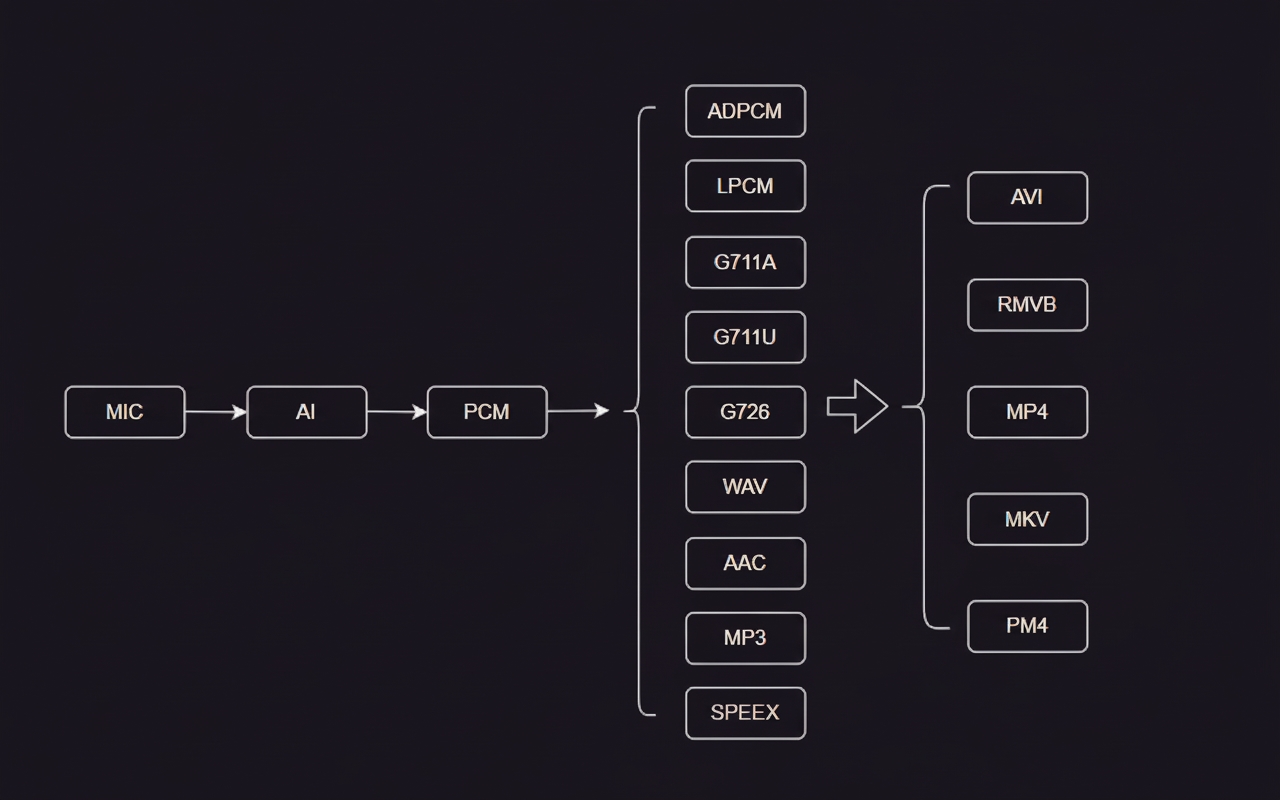
Microphone converts acoustic vibration into electrical (analog or digital) signals and feeds them to the SoC audio input module. The audio input module performs ADC sampling and outputs PCM audio data. PCM data is then compressed, transcoded, and packaged into formats such as AAC or MP3. Compressed audio files are muxed with video into audio-video containers such as MP4.
1.2 Practical Processing Flow
In embedded systems, practical flows are more complex due to resource constraints and mixed application requirements such as local audio storage and network transmission.
PCM is raw audio. Many embedded chips can encode PCM into formats such as G.711 or G.726, but typically do not support AAC encoding directly, often due to licensing. For example, some SoCs such as Junzheng and HiSilicon series do not directly support AAC encoding.
AAC generally provides higher compression than G.711 or G.726, so AAC-encoded audio can take less storage for the same duration. Many video packaging libraries also have good support for AAC.
As a result, a single system may need to handle multiple audio formats simultaneously.
Typical routes:
Route 1
- Send PCM captured by the audio input module directly over the network to an IoT platform.
- Low device-side processing, but high network bandwidth usage.
- Suitable for SoCs without audio encoding hardware.
Route 2
- Encode PCM to G.711, G.726, or similar formats before network transmission.
- Low device-side processing and low bandwidth usage; often the preferred option.
- Suitable for SoCs with built-in audio encoders.
Route 3
- Encode PCM to AAC in software, then package into MP4, AVI, or similar containers.
- Requires CPU, RAM, and flash storage for the AAC encoder library.
- Suitable when AAC is required.
Route 4
- Used when the SoC can only output one audio format at a time. For example, if the SoC outputs encoded G.711/G.726, those frames are software-decoded back to PCM, then re-encoded to AAC and finally packaged into MP4.
- This route uses the most resources and is suitable only when AAC output is mandatory but the SoC cannot output two formats simultaneously.
2. Audio Format Conversion
2.1 PCM and G.711 A/U
PCM
Microphones are either digital or analog. Consumer devices commonly use analog microphones. PCM is the binary sequence obtained by ADC conversion of the analog microphone signal. PCM is uncompressed and typically contains no file header or termination marker.
A PCM file can be opened in tools like Audacity using import raw data and can be played, trimmed, or inspected. Key parameters are channel count, sample rate, and bit depth.
G.711 A-law and mu-law
G.711 has A-law and mu-law variants. It compresses 16-bit PCM samples into 8-bit values via lookup tables. The compression ratio is 1:2; a 1 MB PCM file becomes approximately 0.5 MB in G.711. mu-law (G.711u) is mainly used in North America and Japan, while A-law (G.711a) is used in Europe and other regions.
To play G.711 files on Linux, ffplay can be used:
ffplay -i test.pcm -f s16le -ac 2 -ar 48000 ffplay -i test.g711a -f alaw -ac 2 -ar 48000 ffplay -i test.g711u -f mulaw -ac 2 -ar 48000
-ac: audio channels -ar: sample rate -f: file format
The conversion between G.711 and PCM is relatively straightforward. The author used a simple project to convert between 48 kHz, 16-bit, 2-channel PCM and G.711.
3. AAC Format and Encoding
AAC is more complex than G.711 and has multiple profiles and encoders. FAAC (Freeware Advanced Audio Coder) has been commonly used because it is free.
3.1 AAC File and Stream Formats
AAC file formats include ADIF (Audio Data Interchange Format), which contains header information at the file start, and ADTS (Audio Data Transport Stream), where each frame contains a header. Stream formats include AAC_RAW (raw AAC), AAC_ADTS (same as ADTS), and AAC_LATM (Low-Overhead Audio Transport Multiplex). ADTS is commonly used for both file storage and streaming.
3.2 ADTS Structure
The ADTS header structure used by some libraries is defined as follows:
typedef struct { /* ADTS header fields */ UCHAR mpeg_id; UCHAR layer; UCHAR protection_absent; UCHAR profile; UCHAR sample_freq_index; UCHAR private_bit; UCHAR channel_config; UCHAR original; UCHAR home; UCHAR copyright_id; UCHAR copyright_start; USHORT frame_length; USHORT adts_fullness; UCHAR num_raw_blocks; UCHAR num_pce_bits; } STRUCT_ADTS_BS;
The above lists the header fields; there are 15 items listed and the full header length is 17 bytes. Actual ADTS header length varies: with CRC it is 9 bytes, without CRC it is 7 bytes. For field definitions and bit positions, see ADTS references such as the ADTS page on multimedia wiki.
Using a stream analyzer tool to inspect an ADTS AAC file provides clear frame offsets and field parsing. The analyzer shows the ADTS syncword (12 bits, 0xFFF), the per-frame length, and frame offsets, making it straightforward to parse frames by locating headers and jumping by frame lengths.
3.3 AAC Encoders
Common AAC encoders include FhG, Nero AAC, QuickTime/iTunes, FAAC, and DivX AAC. For embedded use, FAAC and related libraries are commonly used. Typical libraries and tools are:
- FFmpeg: integrates multiple encoders
- fdk-aac: includes FAAC-compatible encoding and decoding
- faac: AAC encoder library
- faad: AAC decoder library
Source code for these libraries is available on GitHub.
3.4 Porting fdk-aac
To port fdk-aac, clone the repository and choose a stable tag. For cross-compiling to a MIPS-based device, an example sequence is:
mkdir _install_uclibc ./autogen.sh CFLAGS+=-muclibc LDFLAGS+=-muclibc CPPFLAGS+=-muclibc CXXFLAGS+=-muclibc ./configure --prefix=$PWD/_install_uclibc --host=mips-linux-gnu make -j4 make install
The compiled files will be under the _install_uclibc directory. Use the file tool to confirm the target architecture, for example:
biao@ubuntu:~/test/fdk-aac-master/_install_uclibc/lib$ file libfdk-aac.so.2.0.2 libfdk-aac.so.2.0.2: ELF 32-bit LSB shared object, MIPS, MIPS32 rel2 version 1 (SYSV), dynamically linked, not stripped
To build and test on a PC, use:
mkdir _install_linux_x86 ./autogen.sh ./configure --prefix=$PWD/_install_linux_x86 make -j4 make install
3.5 Using fdk-aac
This section summarizes encoding a PCM file to AAC and decoding AAC back to PCM using fdk-aac. The fdk-aac source includes a test demo based on WAV input. For raw PCM streams, you must supply stream parameters manually.
(a) PCM to AAC
For raw PCM input, set the encoder parameters explicitly:
int aot, afterburner, eld_sbr, vbr, bitrate, adts, sample_rate, channels, mode; /** Parameter settings **/ aot = 2; /** Audio object type 2: MPEG-4 AAC Low Complexity **/ afterburner = 0; /** Enable analysis-synthesis tool to improve quality at the cost of resources **/ eld_sbr = 0; /** Spectral Band Replication (SBR) **/ vbr = 0; /** Variable bitrate **/ bitrate = 48000; /** Encoding bitrate **/ adts = 1; /** Whether ADTS transport format is used **/ sample_rate = 48000; /** Sample rate **/ channels = 2; /** Channel count **/
Use aacEncoder_SetParam(encoder, AACENC_TRANSMUX, 2) to set the AAC transmux format. Supported values include:
- 0: raw access units - 1: ADIF bitstream format - 2: ADTS bitstream format - 6: Audio Mux Elements (LATM) with muxConfigPresent = 1 - 7: Audio Mux Elements (LATM) with muxConfigPresent = 0, out-of-band StreamMuxConfig - 10: Audio Sync Stream (LOAS)
(b) AAC to PCM
To decode ADTS-format AAC to PCM, locate each AAC frame in the file by parsing ADTS headers to obtain frame positions and lengths. ADTS header typedefs can be represented as:
typedef struct adts_fixed_header { unsigned short syncword:12; unsigned char id:1; unsigned char layer:2; unsigned char protection_absent:1; unsigned char profile:2; unsigned char sampling_frequency_index:4; unsigned char private_bit:1; unsigned char channel_configuration:3; unsigned char original_copy:1; unsigned char home:1; } adts_fixed_header; // length : 28 bits typedef struct adts_variable_header { unsigned char copyright_identification_bit:1; unsigned char copyright_identification_start:1; unsigned short aac_frame_length:13; unsigned short adts_buffer_fullness:11; unsigned char number_of_raw_data_blocks_in_frame:2; } adts_variable_header; // length : 28 bits
Parsing example:
memset(&fixed_header, 0, sizeof(adts_fixed_header)); memset(&variable_header, 0, sizeof(adts_variable_header)); get_fixed_header(headerBuff, &fixed_header); get_variable_header(headerBuff, &variable_header);
When decoding, configure the decoder with the raw configuration using aacDecoder_ConfigRaw. The example below sets a configuration for AAC-LC, 48 kHz, 2 channels:
unsigned char conf[] = {0x11, 0x90}; // AAC-LC 48kHz 2 channels unsigned char* conf_array[1] = { conf }; unsigned int length = 2; if (AAC_DEC_OK != aacDecoder_ConfigRaw(decoder, conf_array, &length)) { printf("error: aac config fail "); exit(1); }
A complete example project structure might look like:
. ├── 48000_16bits_2ch.pcm ├── adts.c ├── adts.h ├── decode_48000_16bits_2ch.pcm ├── include │ └── fdk-aac │ ├── aacdecoder_lib.h │ ├── aacenc_lib.h │ ├── FDK_audio.h │ ├── genericStds.h │ ├── machine_type.h │ └── syslib_channelMapDescr.h ├── lib │ ├── libfdk-aac.a │ ├── libfdk-aac.la │ ├── libfdk-aac.so -> libfdk-aac.so.2.0.2 │ ├── libfdk-aac.so.2 -> libfdk-aac.so.2.0.2 │ ├── libfdk-aac.so.2.0.2 │ └── pkgconfig │ └── fdk-aac.pc ├── Makefile ├── out.aac ├── out_ADIF.aac ├── out_adts.aac ├── out_RAW.aac └── test_faac.c
Conclusion
Embedded audio development covers many topics, and each function involves several technical points. This article provided a concise overview of key concepts and basic usage. Corrections and clarifications are welcome.