Background
On March 15, 2023, CCTV's consumer rights program highlighted concerns that a factory reset on smartphones may not completely erase stored data. The broadcast drew widespread attention from smartphone users about data privacy when reselling or disposing of devices.
What Does "Factory Reset" Mean?
As a personal smart terminal, a smartphone holds photos, payment information, contacts, documents, and other user data. Users are rightly concerned about protecting this information.
In common usage, a factory reset is understood as restoring a device's settings to the state it was in when shipped. The key word here is "settings": a reset typically targets system settings and configurations, and does not necessarily include complete removal of all internal data unless the user expressly selects data-erasure or storage-formatting options.
Use Cases and User Intent
People replace phones frequently as device iterations accelerate. This increases the risk that discarded or secondhand phones might be accessed by others who use technical means to recover stored information. However, a factory reset is not performed only for reselling. Many users run a reset to address software bloat or performance degradation without wanting to delete their personal data.
For example, when a phone becomes sluggish due to accumulated software, restoring system settings can significantly reduce lag. In such cases, users may choose not to format storage so their personal files remain intact. Conversely, when a user needs to permanently remove personal data before disposal or resale, selecting storage format or secure erase options is the appropriate step to maximize data privacy.
How Mobile Systems Present These Options
Most smartphone systems make the distinction explicit. In the example shown during the broadcast, the iQOO reset interface included a clear notice: "To erase music, photos, and other user data, format the SD card and phone storage," and provided an option to format phone storage. Presenting these choices and explaining their effects allows users to make informed decisions.
Similarly, other platforms separate restoring settings from erasing all content. For example, iPhone offers options to reset settings and to erase all content and settings. Xiaomi's settings also present multiple options related to resetting and data erasure.
Analogy with PCs
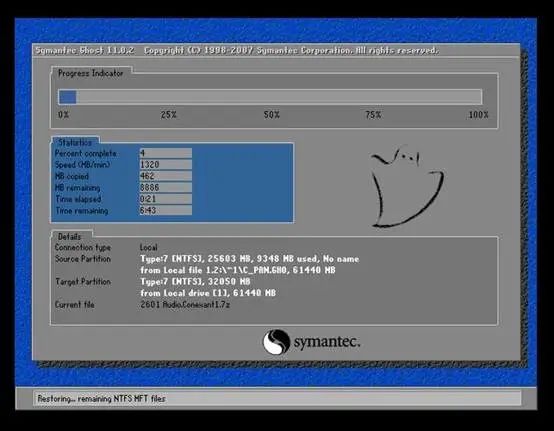
The distinction is similar to how many users partition PC hard drives: one partition holds the operating system while other partitions store data. When the OS needs repair or reinstallation, restoring or reinstalling the system does not necessarily wipe data on other partitions. Smartphones apply a comparable logic by separating system reset actions from storage formatting.
Privacy Features and Industry Practices
Concerns about personal data security have driven system-level privacy features across vendors. In 2020, Xiaomi's MIUI 12 introduced features such as sandbox mechanisms, clipboard privacy protections, approximate location, permission controls, and other privacy-related features. These are intended to reduce unintended data exposure.
The OriginOS implementation mentioned during the broadcast also includes features such as approximate location, permission usage logs, options to erase private information, blank-message authorization, and sensitive permission prompts. The vendor reported that OriginOS passed tests at China Telecommunication Technology Labs and received a product certificate for personal information protection capability.
By comparison, some users have reported persistent issues with unsolicited calendar or invitation content when iCloud synchronization is enabled on certain devices. These reports illustrate that privacy and synchronization behavior can vary across platforms and services.
Conclusion
Smartphone data security is a valid concern. Manufacturers and operating systems provide different levels of control, and many vendors, particularly in China, have implemented privacy features at the system level. Users should increase their knowledge of reset and erase options so they can choose the correct action for their scenario. Offering distinct options for restoring settings versus erasing storage is a standard approach that helps users balance device maintenance and data privacy. Ensuring information security requires both vendor safeguards and informed user choices.