Overview
As LED technology has advanced, displays have moved from large-pitch outdoor products to indoor, near-view applications and increasingly replace DLP, LCD splicing, and projection systems. Daily maintenance and troubleshooting are essential to ensure operational efficiency and extend service life.
Environment and Routine Use
Check daily whether the display environment meets the operating conditions: temperature <= 30°C, humidity <= 60% RH.
Operate the display and supporting equipment at least twice per week for about 2 hours each time. If the display is unused for 5 consecutive days, perform preheating and dehumidification before use.
Waterproof Is Not the Same as Moisture-Proof
Moisture protection refers to preventing water vapor and humidity ingress. LED display components are typically encapsulated with epoxy resin and other plastics. These polymers have relatively large intermolecular gaps that allow water vapor to penetrate the package. LEDs are moisture-sensitive devices and will slowly absorb moisture during use.
LED Moisture Absorption Characteristics
For small-pitch products in environments where temperature <= 30°C and humidity <= 60% RH, the LED moisture absorption follows a characteristic curve shown below.
Hazards from Moisture Ingress
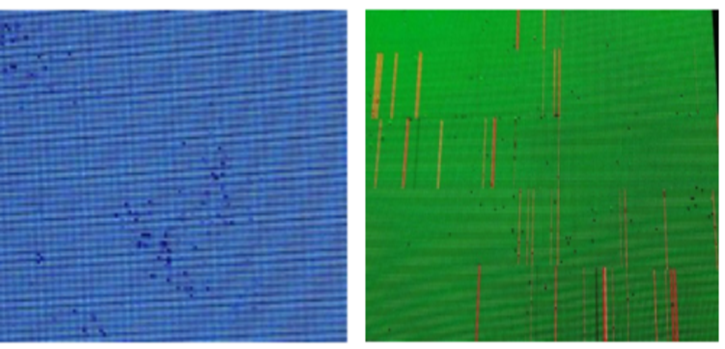
When moisture penetrates LED components, halogen-containing water vapor can reach internal metallic parts. Under power, these halogens can participate in electrochemical reactions with internal metals. Severe cases can cause chip short circuits, leakage or electrode detachment, leading to dead pixels and abnormal adjacent lighting.
Storage and Transport of LED Components
During transport and storage, elevate components and take waterproofing and moisture-proof measures. Monitor temperature and humidity; recommended storage conditions are temperature < 30°C and humidity < 60% RH. Include desiccant during transport and storage.
Spare modules, HUBs, receiver cards, and similar items should be vacuum-packed or sealed with desiccant.
Indoor Dehumidification Methods
- Physical desiccants: place appropriate desiccant packages indoors to reduce airborne moisture.
- Ventilation: when outdoor conditions are not humid and wind is present, ventilate to accelerate evaporation and reduce indoor relative humidity.
- Air conditioning dehumidification: use AC systems to reduce humidity in damp conditions.
- Use dedicated dehumidifiers for more effective moisture control.
Panel Dehumidification During Use
After installation, keep the display regularly powered. If the screen is unused for an extended period (typically 5 to 10 days), perform dehumidification before normal operation. Gradually increase brightness to warm the panel and drive out accumulated moisture. A recommended aging schedule is below.
| No. | Screen brightness | Aging time |
| 1 | 10% | 1 h |
| 2 | 30% | 2 h |
| 3 | 60% | 2 h |
| 4 | 80% | 2.5 h |
| 5 | 100% | 0.5 h |
Caution on Disinfectants
Do not spray chlorine- or bromine-containing disinfectants directly onto LED storage areas, production environments, or in-use displays. Common disinfectants include chlorine-based solutions (such as "84" disinfectant), ethanol, bromine-containing disinfectants, chlorine dioxide tablets, and quaternary ammonium disinfectants. Improper use of chlorine- or bromine-containing agents or chlorine dioxide can corrode LED displays and lamp beads.
Dusting and Cleaning
To maintain optimal display quality, clean surface dust monthly with an antistatic soft brush. As small-pitch LED adoption increases in meeting rooms, education, retail, and cinemas, regular maintenance becomes more important for operational reliability and service life.