Measuring current waveforms: step-by-step
To measure current waveforms with an oscilloscope, follow these steps:
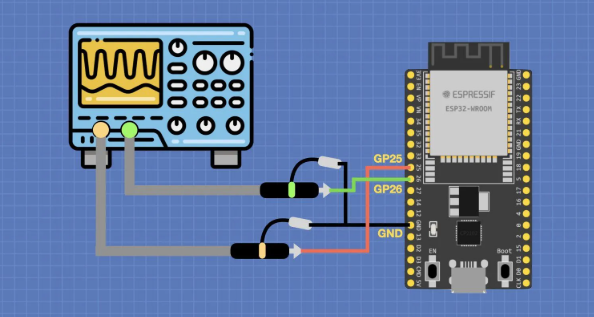
- Prepare the oscilloscope and measurement setup: connect the oscilloscope to the circuit point where current is to be measured. Typically, the oscilloscope ground should be connected to the circuit ground, and the probe—often a dedicated current probe—should be connected at the current measurement point.
- Set up the oscilloscope: power on the oscilloscope and select the correct probe type, measurement range, and coupling mode (DC or AC) appropriate for current measurement.
- Adjust horizontal and timebase: set the horizontal scale and timebase so the waveform is displayed clearly and without distortion on the screen.
- Configure triggering: set trigger mode and trigger level so the waveform displays stably. Choose a trigger type and level that match the signal characteristics.
- Acquire and observe the waveform: start data acquisition and observe or record the current waveform. Adjust settings as needed to obtain a clear, stable trace.
Measuring current waveforms typically requires a dedicated current probe. Consider the oscilloscope input impedance and bandwidth limits when planning measurements. Before making any measurements, ensure you understand the circuit and follow appropriate safety precautions to avoid risk or equipment damage.
Physical parameters an oscilloscope can measure
An oscilloscope is a common test instrument used to measure various signal parameters. Common measurable parameters include:
- Voltage: measure voltage waveforms to inspect amplitude, peak, peak-to-peak, and waveform shape.
- Current: with a current probe, measure current waveforms to analyze shape, peaks, and periodic behavior.
- Frequency: determine the signal frequency or period.
- Phase: measure phase differences between multiple signals, useful for synchronization and phase relationship analysis.
- Timebase: analyze time-domain characteristics by measuring time intervals, period, and duty cycle.
- Rise/Fall time: measure the time for a signal to transition between low and high levels, important for evaluating fast signal transitions.
Many oscilloscopes also provide automatic measurement functions that compute values such as maximum, minimum, average, peak-to-peak, and frequency. Available measurements and features vary by model and manufacturer.
Common oscilloscope display parameters and their meanings
Oscilloscopes display several parameters to help interpret signal and measurement conditions. Common parameters include:
- Time / horizontal base: the time scale on the horizontal axis, showing the time per division (for example, 1 us/div). Use it to determine time intervals and period.
- Voltage / vertical base: the voltage scale on the vertical axis, showing the voltage per division (for example, 1 V/div). Use it to determine amplitude and voltage variations.
- Trigger: controls when the oscilloscope starts recording and displaying the waveform. Includes trigger mode (edge, pulse, video, etc.) and trigger level (the voltage point that causes triggering).
- Vertical position: shifts the waveform up or down on the screen.
- Horizontal position: shifts the waveform left or right on the screen.
- Sample rate: the number of samples per second the oscilloscope takes. Higher sample rates capture more waveform detail.
Additional features may include trigger delay, measurement functions (max, min, average, frequency, etc.), and auto-setup. Specific display formats and operations vary by oscilloscope model.