Introduction
CPU cache, often called cache, is a high-speed buffer memory used by the CPU. This article starts from the computer memory hierarchy to explain performance bottlenecks, then reviews cache evolution using Intel processors as an example. It then explains how cache improves CPU performance via locality principles and analyzes how cache size affects CPU performance.
1. Performance bottlenecks
Under the von Neumann architecture, memory is organized in a hierarchy shaped like a pyramid. From top to bottom: registers, L1 cache, L2 cache, L3 cache, main memory (RAM), and disk.
Storage closer to the CPU has faster access, smaller capacity, and higher cost per byte.
For example, with a 3.0 GHz CPU: registers can be accessed in one clock cycle (about 0.33 ns). Main memory accesses take roughly 120 ns. Solid-state drive (SSD) accesses take on the order of 50 to 150 microseconds. Mechanical hard drive accesses take on the order of 1 to 10 milliseconds.
Early computers did not include cache. As CPU clock rates increased significantly faster than memory speeds starting in the 1980s, CPU access to memory became the primary performance bottleneck. To reduce this gap, cache was introduced to act as an intermediate, faster storage level between CPU and main memory.
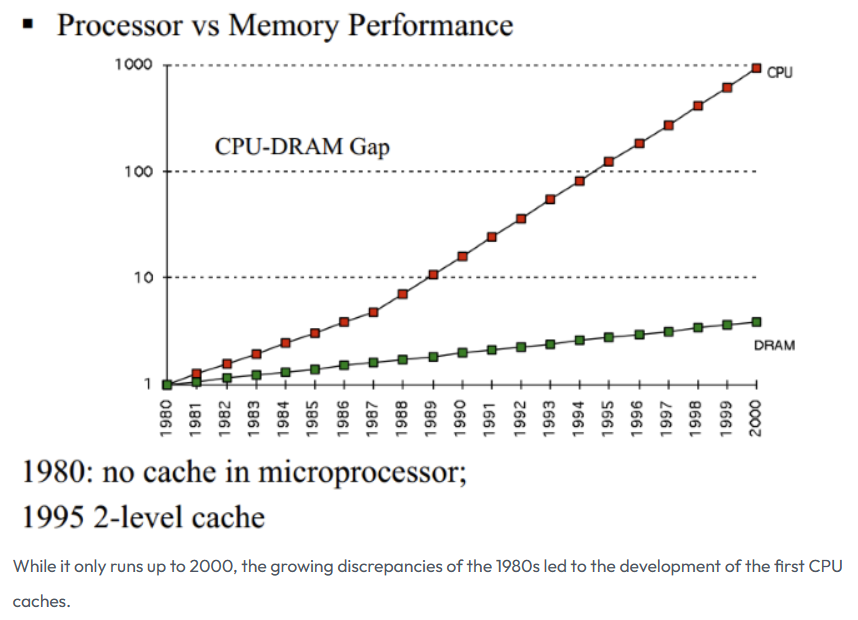
Image source: How L1 and L2 CPU Caches Work, and Why They're an Essential Part of Modern Chips
2. Cache and its evolution
CPU cache typically uses SRAM (static random access memory). Data in SRAM is retained while power is applied and is lost when power is removed.
Using Intel as an example, before the 80286 there was no cache. As CPU speed outpaced memory speed beginning with the 80386, external caches were supported on motherboards. The 80486 integrated an 8 KB L1 cache inside the CPU and supported external L2 caches of 128 KB to 256 KB. Although L1 was only 8 KB, it provided sufficient hit rates at that time. Increasing L2 size later showed a larger overall impact on hit rate than increasing L1 size.
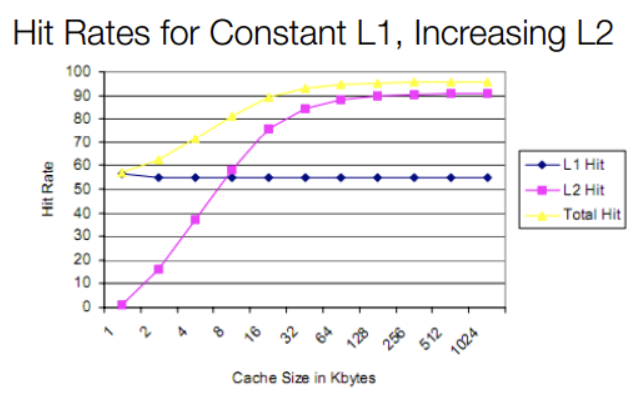
With Pentium (586) and later designs adopting superscalar execution, L1 was split into separate instruction and data caches (each 8 KB) to avoid interference between instruction and data accesses. L2 later moved on-chip with designs such as Pentium Pro. Modern multicore processors initially kept private caches per core, then moved to shared L2/L3 caches with technologies such as Intel's Smart Cache. Today most CPUs use L1, L2, and L3 levels: L1 and L2 are typically per-core and L3 is commonly shared across cores. Some designs also include an L4 cache.
3. How cache bridges the CPU-memory gap
Cache exploits the principle of locality to improve overall performance. Because cache access is much faster than main memory, the goal is to maximize CPU accesses to cache and minimize direct accesses to main memory. The locality principle has two forms:
- Temporal locality: A memory location referenced once is likely to be referenced again in the near future, such as inside loops.
- Spatial locality: If a memory location is referenced, nearby locations are likely to be referenced soon.
Caches store recently accessed instructions and data from main memory. When the CPU requests data, it first checks L1. On an L1 hit, data is returned quickly. On an L1 miss, the CPU checks L2, then L3, and finally main memory if necessary.
4. Is a larger L1 cache always better?
4.1 Impact of increasing L1 on access latency
Increasing L1 capacity raises hit rate, but does a larger L1 always improve performance? Starting with Intel Sunny Cove (10th Gen Core), L1 changed from a 32 KB instruction + 32 KB data split to 32 KB instruction + 48 KB data. As a result, L1 data access latency increased from 4 cycles to 5 cycles. That is, a larger L1 improves hit rate but increases latency. What is the net effect on average memory access time (AMAT)?
Consider a simple three-level hierarchy (L1, L2, off-chip RAM). Let L2 access be 10 cycles and off-chip RAM be 200 cycles. Assume with a 32 KB L1-D the L1 and L2 hit rates are about 90% and 9% respectively, while with a 48 KB L1-D (Sunny Cove) L1 and L2 hit rates become 95% and 4% respectively. Then AMAT for Sunny Cove is approximated as:
0.95 * 5 + 0.04 * 10 + 0.01 * 200 = 7.15 cycles.
For the previous microarchitecture:
0.90 * 4 + 0.09 * 10 + 0.01 * 200 = 6.5 cycles.
The simple model shows that despite improved hit rate, the increased L1 latency raised average memory access time by about 10%. This explains why L1 cache sizes have remained relatively stable over long periods.
In summary, L1 size directly affects access latency, and L1 latency directly impacts AMAT and thus CPU performance.
4.2 Why L1 access latency is constrained
After paging is enabled, load/store addresses are virtual and L1 accesses require virtual-to-physical address translation. Modern CPUs commonly use a virtual-index physical-tag (VIPT) structure for L1. One benefit is that the cache set index can be used to access the cache set concurrently with a TLB lookup, hiding part of the L1 access latency.
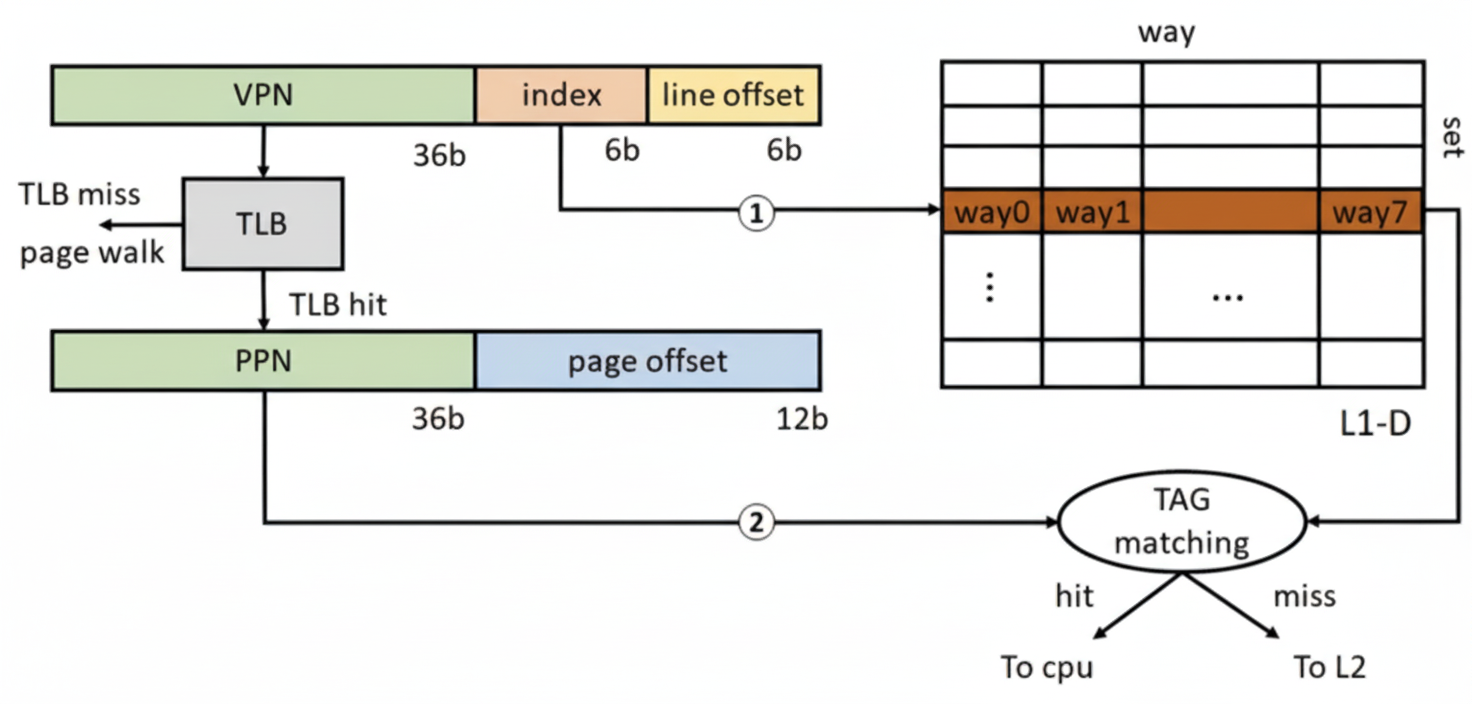
TLB stands for translation lookaside buffer, a small cache of page table entries. For a 4 KB page, there are 12 page offset bits. With a 64 B cache line, the lower 6 bits are the cacheline offset, leaving 6 bits for the L1 index. That limits L1 to 64 cache sets. A 32 KB L1-D then yields 8 ways per set (32 KB / 64 B / 64 sets = 8). Sunny Cove's 48 KB L1-D corresponds to 12 ways per set.
L1 access latency critical path includes the TLB access and the tag matching for the cache set after a TLB hit. Because the TLB itself is a small set-associative structure that requires tag matching, TLB lookup time plus L1 associativity determine L1 latency. To keep L1 latency low, designers keep L1 associativity small; historically 8-way was common. Increasing associativity or the number of sets raises lookup latency and can negate hit-rate benefits.
Moreover, a 32 KB L1 is sized to effectively cover a 4 KB page. With 8 ways, the cache can map multiple pages; increasing capacity may leave many ways underutilized in typical workloads. Increasing cacheline size or associativity increases miss penalty and access latency, making capacity gains potentially counterproductive. Replacement policies and prefetch strategies also complicate the trade-offs, so increased latency often hurts performance more than increased capacity helps.
4.3 Why Apple's M1 has a larger L1 than x86 designs
Apple's M1 uses much larger L1 caches, for example 192 KB L1-I and 128 KB L1-D, while still achieving a 3-cycle access latency. Why is this possible?
First, M1 peak clock rates are generally lower than high-end Intel/AMD desktop and server CPUs, relaxing timing constraints on critical paths such as comparator/tag matching. More importantly, macOS on M1 uses a 16 KB page size rather than the 4 KB page commonly used on x86. A 16 KB page has 14 offset bits, which increases index bits available for cache sets by 2 bits compared with a 4 KB page. That allows L1 to have four times as many sets while keeping associativity similar, explaining why M1 L1 sizes are 4x the sizes seen in some x86 cores (192 KB / 48 KB = 4; 128 KB / 32 KB = 4).
This is a system-level trade-off. Increasing page size reduces page table pressure and improves TLB coverage, but increases internal fragmentation and memory waste. Apple can make these platform choices across hardware and OS because it controls the entire stack for its devices. x86 vendors have to maintain compatibility across a wide range of systems, which constrains similar changes.