Introduction
As an electronic hobbyist, you may start with simple projects using everyday components and standard circuit boards. But when you venture into radio frequency designs, wireless gadgets, or high-speed signals, ordinary materials like FR4 might not deliver the performance you need. Rogers PCB enters the picture as a go-to choice for these scenarios, offering properties that keep signals clean and strong. This simple guide breaks down what Rogers PCB is, its common uses, how it stacks up against FR4, basic design tips, and practical advice on sourcing it. By the end, you’ll feel confident deciding if it’s right for your next build. Let’s dive in without the jargon overload.
What Is Rogers PCB and Why It Matters for Hobbyists
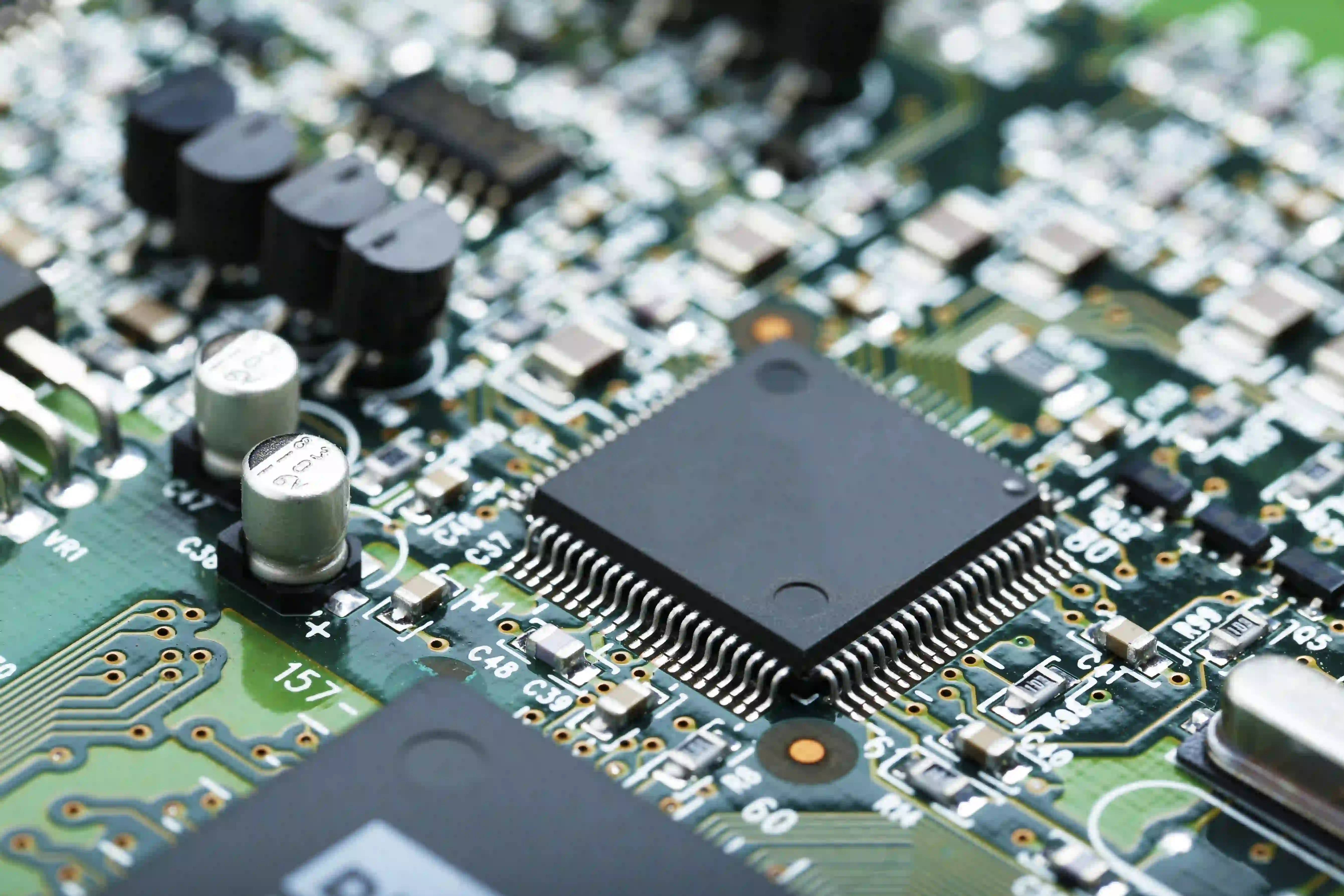
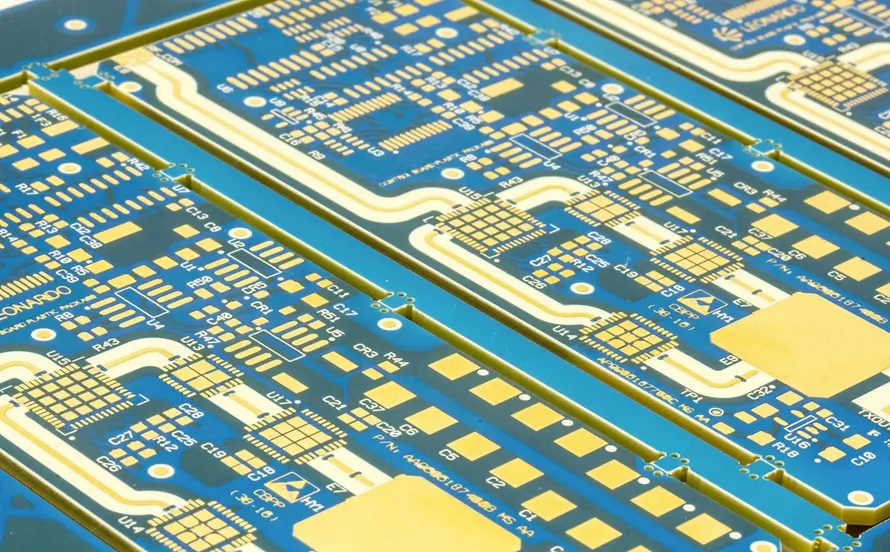
Rogers PCB refers to printed circuit boards fabricated using high-performance laminate materials optimized for high-frequency applications. These materials typically feature a low and stable dielectric constant, often around 3 to 10 depending on the specific type, which helps maintain signal integrity over gigahertz ranges. Unlike basic epoxy-based substrates, Rogers laminates use compositions like ceramic-filled hydrocarbons or polytetrafluoroethylene reinforcements to achieve low dissipation factors. This means less energy loss as signals travel through the board, crucial for hobby projects involving antennas or RF modules.
For hobbyists, Rogers PCB matters because many fun builds—like amateur radio transceivers, drone telemetry systems, or WiFi boosters—operate at frequencies where standard boards introduce too much noise or attenuation. Imagine building a 2.4 GHz antenna: with Rogers, the signal stays sharp without degrading into a fuzzy mess. These boards also handle temperature swings better, resisting warpage during soldering or operation in varying environments. Factory insights reveal that consistent electrical properties across batches make them reliable for repeatable hobby experiments.
Standards like IPC-6012E outline qualification requirements for such rigid printed boards, ensuring they meet performance specs for demanding uses. Hobbyists benefit from this standardization, as it guarantees boards perform predictably without surprises.
Rogers PCB Uses in Everyday Hobbyist Projects
Rogers PCB shines in applications where high-frequency performance is key, such as RF amplifiers, microwave filters, and phased array antennas for model aircraft. Hobbyists often use it for cellular base station prototypes, point-to-point links, or automotive radar sensors in RC cars. Its low loss tangent keeps power efficiency high, ideal for battery-powered gadgets like wireless sensors or IoT nodes operating above 1 GHz. In satellite communication experiments or 5G test setups at home, these boards prevent signal distortion that plagues cheaper alternatives.
Another common use involves high-speed digital circuits bordering on RF, like Gigabit Ethernet interfaces or high-res camera links in robotics. The material’s thermal stability supports dense layouts without hotspots causing failures. For audio enthusiasts tweaking microwave audio gear or radar modules, Rogers ensures clean transmission paths.
Practical examples include building LNBs for satellite TV dishes or custom GPS trackers for drones. These projects demand materials that maintain impedance control over wide bandwidths. Overall, Rogers PCB uses expand your hobby toolkit for anything beyond basic DC circuits.
Rogers PCB vs FR4: A Straightforward Comparison
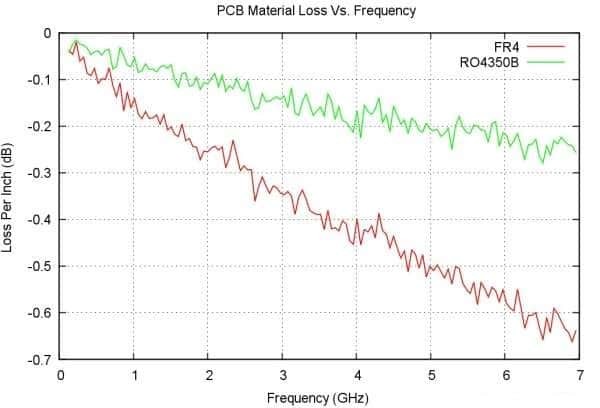
FR4, the workhorse of hobbyist PCBs, relies on woven glass fabric impregnated with epoxy resin, making it affordable and easy to work with for low-frequency designs up to a few hundred MHz. Rogers PCB, in contrast, prioritizes electrical stability with lower dielectric constants and dissipation factors, excelling beyond 1 GHz where FR4’s losses skyrocket. FR4 absorbs more moisture, leading to variable performance, while Rogers variants show absorption rates under 0.1 percent, preserving consistency in humid garages or workshops.
Mechanically, FR4 has higher rigidity but poorer dimensional stability under heat; Rogers materials match copper expansion coefficients closely, reducing stress in multilayer stacks. Cost-wise, FR4 suits prototypes under $10 per square inch, but Rogers justifies its premium for performance-critical hobby builds. Signal integrity tells the tale: at 10 GHz, Rogers insertion loss can be 50 to 80 percent lower, vital for hobby RF chains.
- Dielectric Constant: FR4 ~4.5 and frequency-variable; Rogers 3–10 and stable over GHz range.
- Dissipation Factor: FR4 high (≈0.02+ at 1 GHz); Rogers low (≈0.002–0.004 at 10 GHz).
- Frequency Suitability: FR4 best below ~1 GHz; Rogers ideal above 1 GHz up to mmWave.
- Cost: FR4 low; Rogers higher but justified for RF performance.
- Thermal Stability: FR4 moderate Tg (~130°C); Rogers higher with better CTE match to copper.
This comparison highlights why to switch to Rogers for RF hobbies. IPC-A-600 provides acceptability criteria for both, but Rogers often demands tighter tolerances in inspection.
Basic PCB Design Tips for Rogers Materials
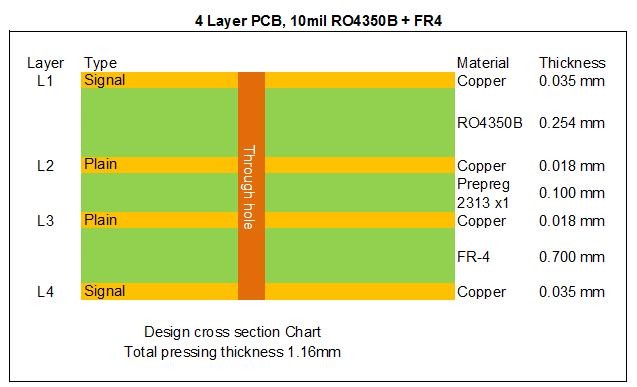
Start basic PCB design by selecting the right Rogers series based on your frequency: lower Dk for higher speeds. Use controlled impedance traces, aiming for 50 ohms microstrips with widths calculated via online calculators adjusted for the material’s thickness and Dk. Layer stackups require care; pair Rogers cores with compatible bond plies to avoid CTE mismatches causing delamination. Keep vias short and back-drilled if possible to minimize stubs in high-freq paths.
Routing rules emphasize symmetry: ground planes under signal lines for consistent fields, avoiding sharp bends over 45 degrees. For hobbyists, simulate first with free tools to verify S-parameters before fab. Soldering needs low-heat profiles due to sensitivity; follow JEDEC J-STD-020E for reflow sensitivity to prevent pops.
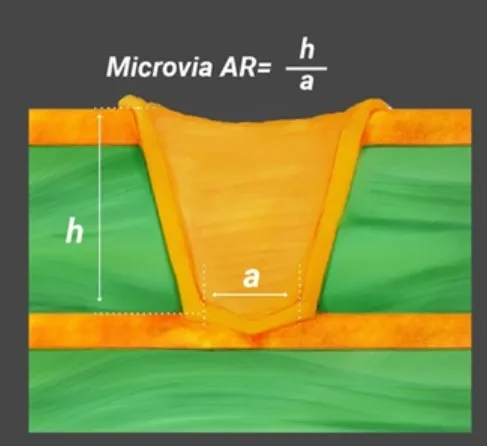
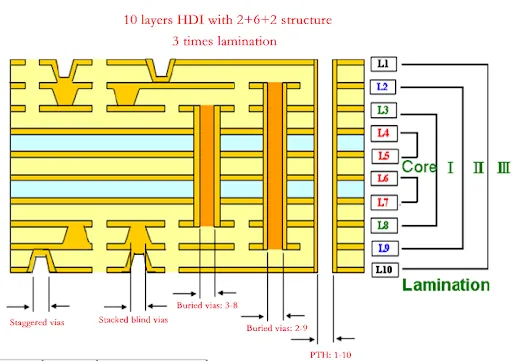
Test prototypes with a VNA if available, checking return loss. Multilayer designs benefit from blind vias for density. These steps ensure your Rogers PCB performs as intended.
Best Practices for Sourcing and Handling Rogers PCB
When wondering where to buy Rogers PCB, look for PCB fabrication services offering high-frequency materials with quick-turn prototypes suitable for hobbyists. Specify the exact laminate grade in your order files, along with impedance requirements and IPC Class 2 or 3 finishes. Start small with single-layer or 2-layer panels to control costs, scaling up as your design proves out.
Handling involves clean environments to avoid contamination affecting low-loss surfaces. Store boards in dry boxes, as even low absorption can shift properties. During assembly, use no-clean fluxes and profile ovens per manufacturer data sheets.
For hobby volumes, panelize designs for efficiency. Verify fab capabilities for scoring and plating uniformity.
Conclusion
Rogers PCB opens doors for hobbyists tackling high-frequency challenges, from clean RF signals to stable high-speed links. Understanding its advantages over FR4, key uses, and basic design principles equips you for success. With proper sourcing and handling, your projects will outperform standard boards without unnecessary complexity. Experiment confidently, reference standards for quality, and watch your electronics hobby evolve.
FAQs
Q1: What is Rogers PCB?
A1: Rogers PCB is a high-performance printed circuit board material designed for high-frequency applications, featuring low dielectric constant and dissipation factor for minimal signal loss. It uses specialized composites like ceramic-filled laminates, ideal for RF hobby projects. Unlike FR4, it maintains stability up to microwave frequencies. Hobbyists use it for antennas and wireless modules where precision matters.
Q2: What are common Rogers PCB uses for hobbyists?
A2: Rogers PCB uses include RF amplifiers, drone radars, amateur radio gear, and IoT sensors operating above 1 GHz. Its low loss ensures efficient power use in battery devices. Great for prototyping microwave filters or phased arrays. Factory processes align with standards for reliable performance in these apps.
Q3: Rogers PCB vs FR4: When should I choose Rogers?
A3: Choose Rogers PCB over FR4 for frequencies above 1 GHz, where FR4’s high dissipation causes signal degradation. Rogers offers better thermal stability and impedance control for RF designs. FR4 suffices for low-speed hobby boards due to cost. Switch for clean signals in wireless projects.
Q4: Where to buy Rogers PCB as a beginner hobbyist?
A4: Buy Rogers PCB from online PCB fabricators supporting high-frequency laminates with prototype services. Upload Gerber files specifying the material and impedance specs. Opt for quick-turn options for testing. Check for IPC-compliant processes to ensure quality. Start with small quantities to fit hobby budgets.
References
IPC-6012E — Qualification and Performance Specification for Rigid Printed Boards. IPC, 2017
IPC-A-600K — Acceptability of Printed Boards. IPC, 2020
JEDEC J-STD-020E — Moisture/Reflow Sensitivity Classification. JEDEC, 2014