Introduction
1. What is White-Plus-Black
The "white" in white-plus-black refers to files that are included in an antivirus trusted list, for example Windows system files or files with valid digital signatures. The "black" refers to the local file that lacks a valid certificate signature and is not a recognized system file. Such files are typically treated as suspicious by antivirus products.
2. Purpose of the white-plus-black technique
Many antivirus solutions apply relaxed restrictions to trusted "white" files. If an attacker can run an unsigned "black" component inside the same process as a trusted "white" binary, some antivirus checks may be bypassed.
How to locate and exploit white files
1. Thinking and solution
Question: How can we load our black component into a white binary?
Answer: A common method is to use code injection techniques to execute code inside another process.
Question: How is a DLL loaded when a program starts?
Answer: At program load time, the loader looks for DLLs in the current executable folder before system paths, but the DLLs must appear in the executable's import table unless they are loaded dynamically.
2. Finding white files
Start by locating signed executables or known system binaries. The screenshots below illustrate signature verification; a valid digital signature is required.
Some common applications can be used. Prefer binaries that have small directories to reduce deployment effort.
For example, an uninstall.exe in a Steam folder was observed with Process Monitor loading "C:WindowsSystem32wow64log.dll". The idea is to place a custom wow64log.dll in the same directory as uninstall.exe so the local DLL is loaded instead of the System32 copy.
Next, attempt to create a replacement DLL and test loading it.
3. Constructing wow64log.dll
First, determine which functions the executable expects from the DLL. You must provide any required functions or the program will fail to load the DLL. Tools such as dumpbin or PE viewers can be used to inspect the import table.
The import table does not list wow64log.dll, so the executable likely loads it dynamically or the loader uses a default. In that case you do not need to implement exported functions; a simple fake DLL may suffice.
Next, determine whether the target executable is 32-bit or 64-bit using PE analysis tools such as DIE or x64dbg.
This executable is PE32, so the replacement DLL must be a 32-bit DLL.
When attaching to the process, show a message box from the DLL entry point to verify the DLL is loaded.
Build the DLL for the corresponding architecture; x86 compilation produces a PE32 DLL.
After compiling, place the DLL in the same directory as the executable and run the executable to test loading.
If the DLL does not load, the target file may not be exploitable and another candidate should be used.
For example, a corporate messaging app executable was tested.
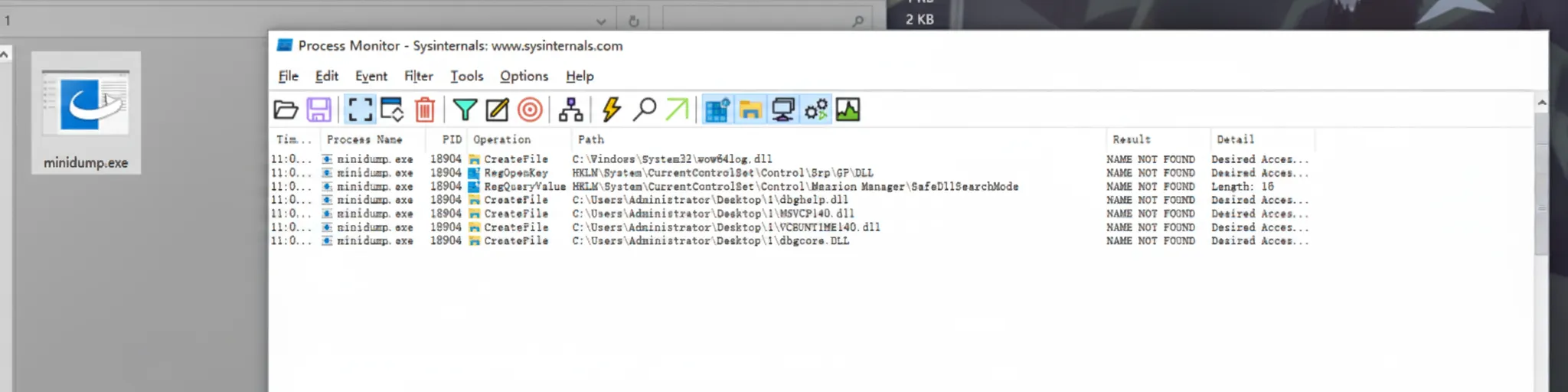
The program initially loads dbghelp.dll. Rename the custom DLL to match dbghelp.dll to see if the application will attempt to load it from the local folder.
Seeing an error at this stage is an important step: it indicates the executable tried to load the local DLL but failed because required functions were not provided. Use dumpbin to inspect which functions are required.
C:UsersAdministratorDesktop1>dumpbin /imports minidump.exe Microsoft (R) COFF/PE Dumper Version 14.36.32535.0 Copyright (C) Microsoft Corporation. All rights reserved. Dump of file minidump.exe File Type: EXECUTABLE IMAGE Section contains the following imports: dbghelp.dll 403108 Import Address Table 403A6C Import Name Table 0 time date stamp 0 Index of first forwarder reference 1D MiniDumpWriteDump
Here the DLL must provide the MiniDumpWriteDump function. Add this function to the DLL code and recompile.
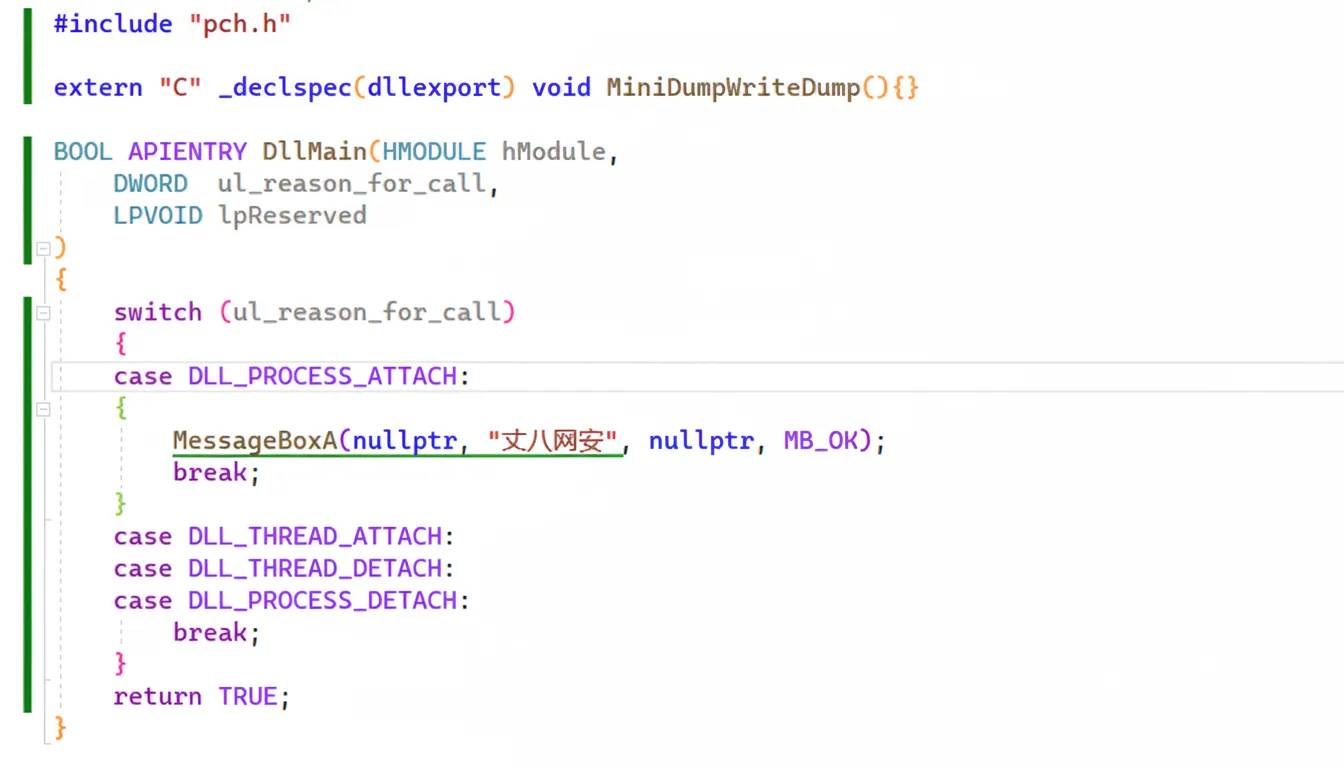
After compiling and deploying the DLL with the required export, the message box demonstrates successful loading.
How to detect white-plus-black programs
1. Antivirus detection
Antivirus products can detect simple white-plus-black attempts by hashing system DLLs and flagging local files that impersonate them. In general, defenders can compare hashes against known system files; if a local DLL replicates a system DLL name but has a different hash, it is suspicious. One mitigation for attackers is to target white binaries that do not expect system DLLs, but that is a defensive concern.
2. Manual detection
Manual inspection is straightforward. Look for executables that only have a single accompanying DLL, since malware often does not include many files. Right-click the DLL to view file properties and check for a digital signature. If there is no signature or the signature is invalid, the file is suspicious. This verification can also be automated in code.
Both antivirus checks and simple manual checks can raise suspicion about a program being a white-plus-black case.