









What is the “Compare Materials & Prices” Feature?
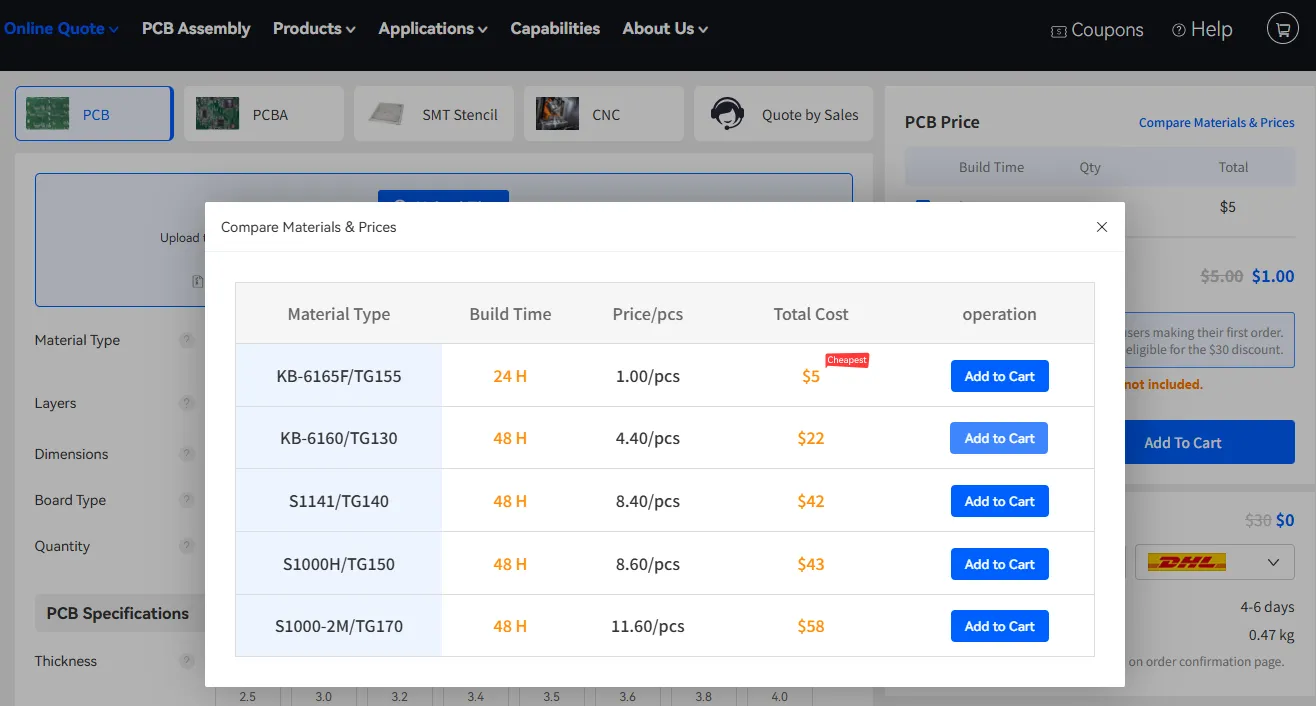
The Compare Materials & Prices tool allows you to view side-by-side pricing and lead times for different PCB base materials that match your current board parameters.
It is especially useful when you want to balance cost, performance (such as Tg value), and production time without leaving the quote page.
How to Access It
- Open the Online PCB Quote page and set your main specifications.
- In the right-hand “PCB Price” panel, click the Compare Materials & Prices link (usually located at the top right of the price summary).
A comparison table will appear in a pop-up window.
What Information Does It Show?
The table typically includes:
- Material Type – Specific laminate grades (e.g., KB-6165F/TG155, KB-6160/TG130, S1141/TG140, etc.)
- Build Time – Production time for each material option (e.g., 24 H or 48 H)
- Price/pcs – Unit price of the material
- Total Cost – Total price based on your current quantity
- Operation – Quick “Add to Cart” button for each option
The lowest-cost option is often marked with a “Cheapest” label for easy identification.
Benefits
- Quickly evaluate cost vs. performance trade-offs
- See how material choice affects both price and lead time
- Switch to a different material and add it to cart in one click
This feature gives you transparent material options so you can select the best balance of quality, cost, and delivery time for your project.


