








What is the Quantity/Price Matrix?
The Quantity/Price Matrix is a convenient tool on AIVON’s online PCB quote page that lets you quickly view and compare pricing for different order quantities without repeatedly changing your main quote parameters.
It helps you see how unit price and total cost change as quantity increases, so you can choose the most cost-effective quantity for your project.
How to Access It
- Go to the Online PCB Quote page.
- Enter your basic parameters (layers, dimensions, material, etc.).
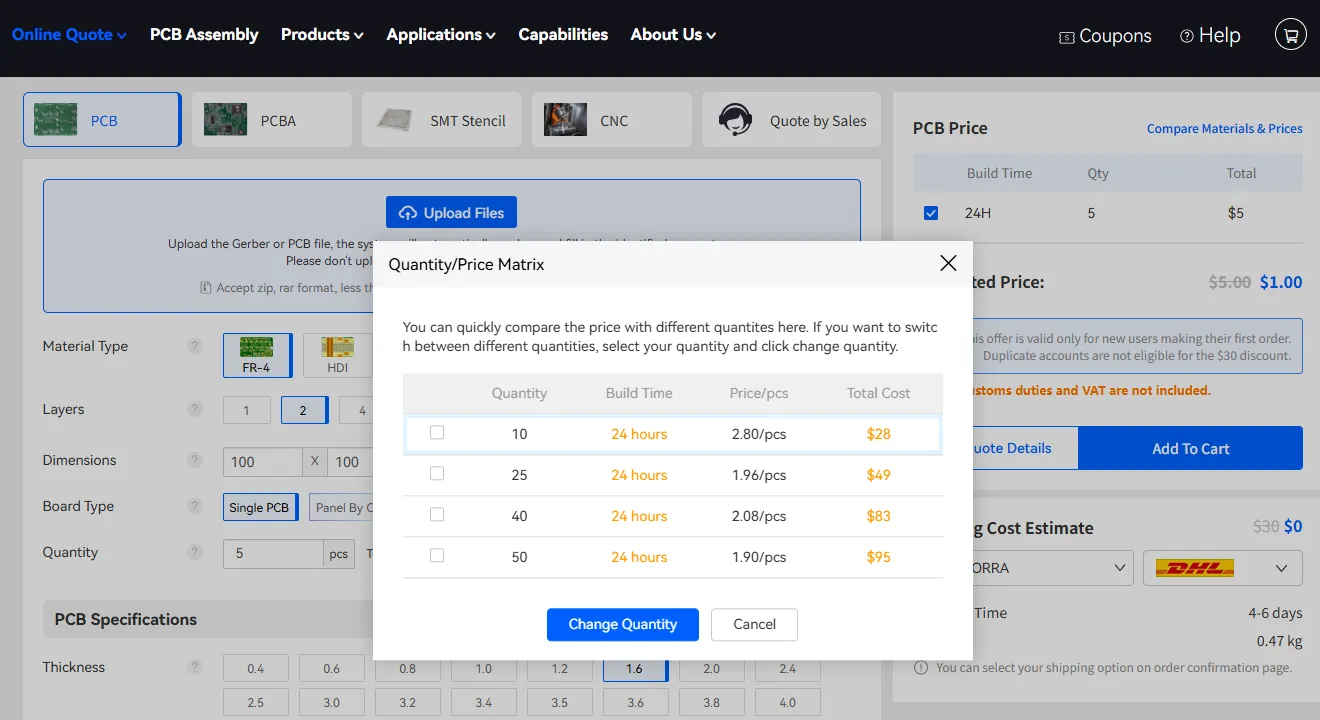
- Next to the Quantity field, click the Quantity/Price Matrix » link.
A pop-up window will open.
What Information Does It Show?
The matrix displays a clear table with the following columns:
- Quantity – Different available quantity options (e.g., 10, 25, 40, 50 pcs)
- Build Time – Production lead time for each quantity
- Price/pcs – Unit price at that quantity
- Total Cost – Overall cost for the selected quantity
You can select a preferred quantity and click Change Quantity to apply it to your quote, or click Cancel to close the window.
Benefits
- Instantly compare volume discounts
- Avoid trial-and-error by changing the quantity field multiple times
- Make faster, more informed ordering decisions based on real pricing data
Using the Quantity/Price Matrix helps you optimize cost and lead time before adding the board to your cart.


