




From KiCad to PCB Order: AIVON Plugin Eliminates Manual Gerber Export
What This Video Covers
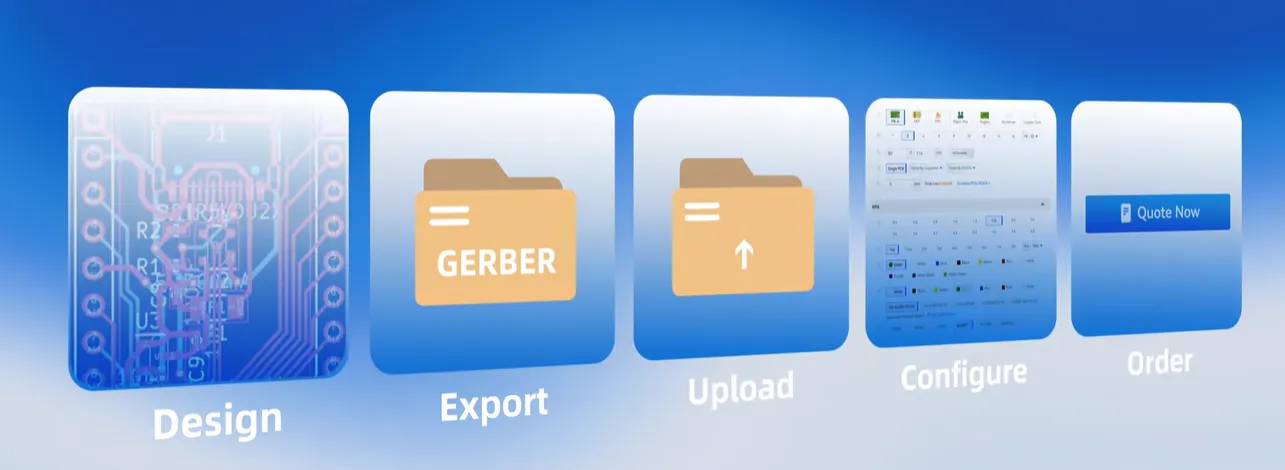
This video demonstrates how engineers can move from KiCad design completion to a production-ready instant PCB quote without leaving the CAD environment. It highlights the friction of traditional multi-step processes—exporting Gerbers, uploading files, configuring options, and requesting quotes—and shows how the AIVON KiCad plugin collapses these into a single workflow: open the plugin, upload the design automatically, review settings, and receive an immediate quote.
The content focuses on practical manufacturing handoff improvements, including reduced risk of file version mismatches and faster iteration for PCB prototype builds. It is relevant for teams developing rigid, multilayer, or mixed-technology boards used in industrial control systems, IoT devices, and consumer electronics, where rapid design-to-order cycles improve time-to-market. Viewers learn how integrating quoting directly into KiCad supports cleaner DFM communication and shortens the path from schematic to fabricated board. For projects that also require assembly, the same streamlined approach aligns with PCB assembly quoting workflows.
Key Highlights
- The AIVON KiCad plugin replaces the multi-step Design → Export → Upload → Configure → Quote → Order sequence with a single in-tool flow: Design → Click → Order.
- Automatic design upload and instant quoting reduce tool-switching overhead and lower the chance of incomplete or mismatched Gerber sets reaching the fabricator.
- Engineers retain more time for design iteration while maintaining direct control over manufacturing parameters before committing to production.
How the AIVON KiCad Plugin Creates a Direct Design-to-Order Workflow
Most PCB design cycles still end with a manual handoff. After finishing the layout in KiCad, the engineer must generate Gerber and drill files, package them, navigate to a manufacturer portal, upload the archive, select layer count, material, surface finish, and quantity, then wait for a quote. Each step introduces delay and potential error—incorrect stack-up selection, missing files, or outdated revisions.
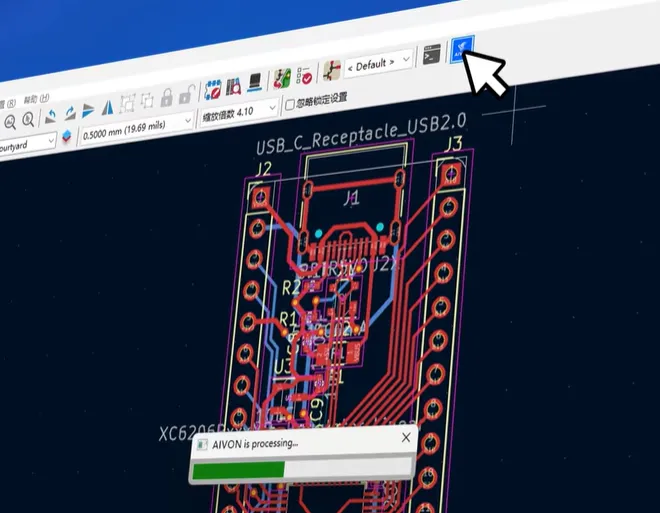
The AIVON KiCad plugin removes these intermediate stages. Once the design is complete, the engineer opens the plugin inside KiCad. The tool automatically packages the necessary manufacturing data, transfers it to the AIVON quoting engine, presents configurable manufacturing options, and returns a real-time price. The engineer reviews the settings, confirms the order, and proceeds. The entire sequence stays inside the familiar CAD interface.
This approach is particularly valuable for iterative PCB prototype work and low-to-medium volume builds. Design changes can be quoted and released in minutes rather than hours, supporting tighter feedback loops between electrical and mechanical teams. For production runs, the same clean data path improves consistency between the approved design and the boards that enter fabrication.
Traditional Gerber Export vs. Plugin-Based Ordering: Process Comparison
The difference between conventional and plugin-driven ordering is best understood as a reduction in process steps and risk points.
| Aspect | Traditional Manual Process | AIVON KiCad Plugin Workflow |
|---|---|---|
| File Generation | Manual Gerber + drill export + ZIP packaging | Automatic packaging inside KiCad |
| Data Transfer | Browser upload to manufacturer portal | Direct secure transfer from plugin |
| Quote Configuration | Separate portal form (layers, finish, qty, etc.) | In-tool review of manufacturing settings |
| Quote Turnaround | Minutes to hours depending on portal load | Instant quote after settings confirmation |
| Revision Risk | High – wrong file version easily uploaded | Low – current design state is used |
| Tool Switching | CAD → File Explorer → Browser → Email | Remains inside KiCad |
| Typical Cycle Time | 15–45 minutes plus waiting | Under 5 minutes from design freeze to quote |
Factory experience shows that incomplete Gerber sets or mismatched drill files remain among the top causes of quote delays and first-article rejects. By eliminating the export-and-upload step, the plugin reduces these failure modes at the source. Engineers still retain full visibility into manufacturing parameters—layer count, copper weight, surface finish (ENIG, HASL, etc.), and quantity—so DFM intent is preserved rather than diluted through multiple handoffs.
DFM and Manufacturing Benefits of Ordering PCBs Directly from KiCad
Direct ordering from the CAD tool improves data integrity. The fabrication package is generated from the live design rather than a previously exported snapshot, reducing the chance that last-minute netlist or mechanical changes are omitted. This is especially useful for multilayer boards, controlled-impedance designs, and boards that will later enter PCB assembly, where consistent source data shortens NPI cycles.
From a manufacturing perspective, the cleaner handoff supports faster DFM review. When the fabricator receives a complete, current dataset, automated checks for minimum trace/space, annular ring, and drill-to-copper can run immediately. Engineers receive feedback while the design is still open, allowing corrections before the order is finalized. This closed-loop approach is more efficient than discovering issues only after the quote has been accepted and production has been scheduled.
Practical recommendation: treat the plugin quote review screen as the final DFM checkpoint. Verify stack-up, surface finish, and any special requirements (impedance, heavy copper, etc.) before confirming. For projects involving flexible or rigid-flex constructions, confirm that the plugin correctly captures the necessary additional files or notes; when in doubt, cross-check against the standard online PCB quote portal for completeness.
FAQ
Q1: Does the AIVON KiCad plugin support multilayer and HDI PCB designs?
A1: Yes. The plugin transfers the complete design data, including layer stack information. Standard multilayer boards and most HDI constructions can be quoted. Complex HDI with multiple sequential lamination cycles should be verified against current manufacturing capabilities during the in-tool review step.
Q2: How accurate is the instant quote generated from KiCad?
A2: The quote reflects current fabrication pricing based on the design parameters and selected options (layer count, material, finish, quantity). It is production-valid once the engineer confirms the settings. Final order confirmation locks the price and manufacturing specification.
Q3: Can I order PCB assembly or only bare boards through the plugin?
A3: The core plugin flow is optimized for bare PCB fabrication and quoting. For turnkey or partial PCB assembly requirements, engineers can use the generated quote as the starting point and complete assembly configuration through the dedicated PCBA quoting interface.
Q4: What happens if my KiCad design uses non-standard stack-ups or materials?
A4: The plugin presents the available standard options. Non-standard requirements (special materials, controlled impedance targets, heavy copper) can be noted or handled by switching to the full online quote portal after the initial design transfer, ensuring the fabricator receives complete engineering notes.
Q5: Is the design data secure when uploaded through the KiCad plugin?
A5: Design files are transferred over encrypted channels and processed under the same data-handling policies used for standard portal uploads. No permanent public storage of customer designs occurs outside the order record.
Still exporting and uploading manually?
Too many steps.
Design——Export——Upload—— Configure——Quote——Order.
Now go from design to order directly in KiCad.
Design. Click. Order.
Click the Plugin——Upload Automatically——Review Settings——Instant Quote.
Design in KiCad,Order with AIVON
Spend less time switching.
More time designing.
One workflow. Faster results.
Still exporting and uploading your Gerbers manually?
That means extra steps between your design and production.
Now, you can start your PCB order directly from KiCad.
Simply open the plugin, send your design, review your settings, and get an instant quote.
Design in KiCad. Order with AIVON.
Spend less time switching tools, and more time designing.
One workflow. Faster results.