




Introduction
Creating an 8-layer printed circuit board as a DIY project is a rewarding yet complex endeavor for electronic hobbyists. These multilayer boards enable compact designs with high functionality, often used in advanced projects like embedded systems or high-speed digital circuits. However, the increased layer count introduces unique challenges, from short circuits to open circuits, that can derail a project. This comprehensive PCB troubleshooting guide addresses common issues in DIY 8-layer PCBs, offering practical solutions for fixing short circuits, identifying open circuits, testing PCB continuity, and applying rework techniques. Whether you are debugging a prototype or refining a design, understanding these problems and their solutions will elevate your skills and ensure reliable outcomes in your electronic projects.
What Are 8-Layer PCBs and Why Is Troubleshooting More Difficult?
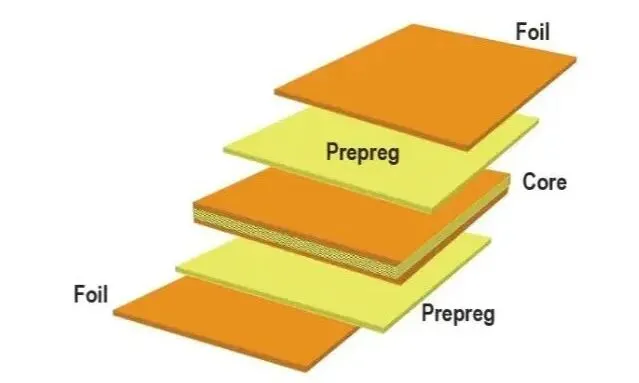
An 8 layer PCB consists of eight conductive copper layers separated by insulating materials, typically used for complex circuits requiring dense routing and noise isolation. Electronic hobbyists often turn to these boards for projects involving microcontrollers, RF applications, or high-speed data transfer, where single or double-layer boards fall short. The multiple layers allow for dedicated power and ground planes, reducing electromagnetic interference and improving signal integrity. However, the complexity of 8-layer designs amplifies the risk of manufacturing defects and assembly errors. Issues like short circuits between layers or broken traces can be harder to detect and fix compared to simpler boards. Mastering troubleshooting for these PCBs is essential to ensure functionality and avoid costly redesigns or wasted materials in DIY projects.
The main troubleshooting challenge is that most conductive paths are not directly accessible. A visible surface trace can be inspected under magnification, but an internal trace or buried via may be damaged without showing an obvious external sign. A board that appears undamaged can still contain an electrical open, an interlayer short, or a connection that fails intermittently.
The complexity of the stackup also affects repair decisions. Applying excessive heat, drilling into the wrong area, or removing too much material can damage adjacent layers. Before attempting multilayer PCB repair, it is important to establish whether the problem is accessible and whether the proposed repair can preserve the board's electrical and mechanical integrity.
Technical Causes of Common Issues in 8-Layer PCBs
Short Circuits Between Traces or Layers
A short circuit occurs when two electrical nodes that should remain isolated become unintentionally connected. On an 8-layer PCB, this may happen because of solder bridges, conductive debris, damaged insulation, fabrication defects, or incorrect component assembly.
A short between power and ground can prevent a board from starting or cause excessive current consumption. A short between signal nets may produce incorrect logic levels or communication errors. Internal shorts are more difficult to diagnose because the affected copper paths are buried inside the board.
Start by checking the schematic and identifying which nets should be electrically isolated. Measure resistance with the board powered off and compare the readings with expected circuit behavior. Remember that capacitors, semiconductor junctions, and parallel circuit paths can produce low or changing resistance readings even when no short is present.
Open Circuits and Broken Traces
An open circuit interrupts the intended current path. Common causes include damaged copper traces, cracked solder joints, incomplete via connections, and fabrication defects.
Symptoms vary with the affected net. A power connection may leave a component unpowered, while an open signal trace can interrupt communication or cause intermittent operation. An open connection on an internal layer may be invisible during a normal visual inspection.
Begin with the circuit schematic and identify the expected connection between the source and destination. Test accessible pads, vias, and component pins with a multimeter in continuity mode. If the external connections appear intact but the circuit remains open, consider the possibility of a buried trace or via defect.
Via and Interlayer Connection Failures
Vias provide electrical connections between copper layers. Plated through-holes can connect multiple layers, while blind and buried vias serve specific layer combinations in more complex designs.
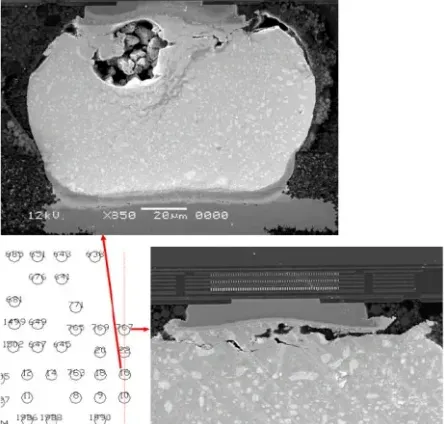
Via failures may result from plating defects, mechanical stress, thermal cycling, or damage during fabrication and assembly. A defective via can interrupt a signal path or create an intermittent connection that appears only under certain operating conditions.
Inspect accessible vias for visible damage and test continuity between the connected points identified in the design files. If the failure appears to involve an internal via, ordinary continuity testing may confirm the electrical problem without revealing its physical location. Further investigation may require specialized inspection or professional failure analysis.
Intermittent Connections and Signal Integrity Problems
Not every PCB failure produces a complete short or open circuit. A board may operate normally at low speed but fail during high-speed communication, under load, or after repeated temperature changes.
Possible causes include marginal solder joints, impedance discontinuities, poor return paths, excessive crosstalk, and damaged interconnections. These issues require a different diagnostic approach from basic continuity testing.
Review the multilayer PCB stackup, routing, grounding, and power distribution before assuming that a component needs replacement. An oscilloscope can help reveal signal distortion, ringing, or unexpected timing behavior. For high-speed designs, measurements should use appropriate probes and techniques to avoid introducing additional loading or measurement artifacts.

Suggested Reading: Signal Integrity for Hobbyists: Simple Tips for Better 8 Layer PCB Designs
Practical Solutions for Troubleshooting 8-Layer PCBs
Step-by-Step Multilayer PCB Troubleshooting Guide
Troubleshooting an 8-layer PCB requires a methodical approach to isolate and resolve issues. Start with a visual inspection under good lighting or magnification to spot obvious defects like solder bridges, cracked traces, or misaligned components. Use a multimeter for testing PCB continuity across traces and vias, ensuring each path conducts as expected. For deeper issues, consider thermal imaging to detect hot spots indicative of shorts, though this may require specialized tools beyond a typical hobbyist setup. Document each test to avoid repeating steps and to track potential failure points.
Fixing Short Circuits in Dense Layouts
To address short circuits, begin by isolating the affected area through continuity testing with a multimeter set to the lowest resistance range. Check between adjacent pins, traces, or planes to locate unintended connections. If a short is found, carefully remove excess solder using a desoldering wick or pump, ensuring not to damage nearby components. For interlayer shorts, which are harder to access, inspect via barrels for defects using magnification. If the short persists, it may indicate a fabrication flaw, requiring advanced rework techniques or a board redesign.

Identifying Open Circuits in Hidden Layers
When suspecting an open circuit, use a multimeter in continuity mode to test between endpoints of a suspected trace or via. Start at component pads and work inward, checking each segment. If the break is in an internal layer, external testing may not suffice, and hobbyists might need to rely on design schematics to infer the fault location. In some cases, applying a small voltage and observing current flow with a sensitive meter can help confirm the break. Repairing internal opens often requires professional equipment, but surface breaks can be bridged with fine wire and solder as a temporary fix.
Testing PCB Continuity for Reliable Connections
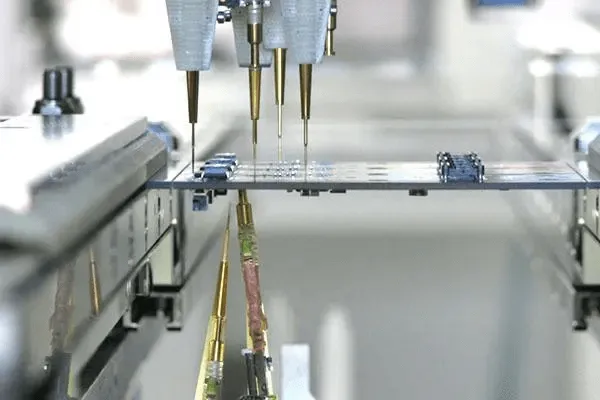
Testing PCB continuity is fundamental to ensuring all connections function as intended. Set a multimeter to continuity mode and probe between points that should be connected, such as via ends or trace endpoints. A beep or low resistance reading confirms a good connection. Test systematically across all critical paths, especially power and ground planes, to rule out partial failures. For 8-layer boards, focus on vias connecting internal layers, as these are common failure points. Consistent testing prevents overlooking subtle issues that could affect performance.

Essential Multilayer PCB Troubleshooting Tools
The right tools depend on the type of fault and how much of the circuit is accessible. A basic electronics workbench can handle many assembly-related problems, while internal defects and high-speed signal issues may require more advanced equipment.
Digital Multimeter
A digital multimeter is the primary tool for basic PCB fault diagnosis. Resistance measurements help investigate suspected shorts, continuity mode checks accessible electrical paths, and voltage measurements verify power rails during controlled testing.
Use resistance and continuity modes only on an appropriately unpowered circuit. Before measuring voltage on an energized board, confirm the meter setting, probe rating, and measurement points.
Oscilloscope
An oscilloscope displays electrical signals over time and helps investigate problems that a multimeter cannot capture. It is useful for checking clocks, reset signals, switching waveforms, and communication lines.
Incorrect probing can distort high-speed signals, so use suitable probes and grounding methods. An oscilloscope also cannot directly reveal every internal PCB defect; it helps identify abnormal electrical behavior that can then be traced to its likely cause.
Thermal Camera
Thermal imaging can help locate abnormal hot spots caused by excessive current, component faults, or certain short circuits. It is particularly useful when a defect is difficult to see but produces a measurable temperature difference.
Not every short generates enough heat to be detected, and heat may spread from the actual fault to nearby components. Use thermal imaging as a diagnostic aid rather than definitive proof of a fault location.
Microscope and X-Ray Inspection
A microscope supports detailed inspection of solder joints, pads, exposed copper, and accessible via structures. It is especially valuable when working with fine-pitch components.
X-ray inspection can reveal certain hidden structural problems, such as soldering defects beneath components or irregularities in some internal features. Its effectiveness depends on the defect and imaging setup, and it does not directly identify every electrical failure.
When measurements indicate an internal-layer problem but its location remains uncertain, professional inspection may be more effective than attempting invasive DIY repair.
Practical Circuit Board Repair Techniques for 8-Layer PCBs
Removing Solder Bridges and Correcting Assembly Errors
If inspection confirms a surface solder bridge, use an appropriate soldering iron, flux, and desoldering wick or a suitable desoldering tool to remove excess solder. Work carefully around adjacent pads and components, especially in fine-pitch areas.
After rework, inspect the area again and repeat the relevant continuity or resistance checks before applying power. If the short remains, investigate the circuit rather than repeatedly heating the same area.
Repairing Accessible Trace Damage
A damaged surface trace may sometimes be repaired with a suitable jumper wire. The repair requires a clear understanding of the original electrical path, sufficient access to intact copper, and appropriate insulation and mechanical support.
Before attempting the repair, confirm that the trace is genuinely open and determine its role in the circuit. High-current nets, controlled-impedance signals, and high-speed differential pairs require additional care because a simple jumper may not preserve the original electrical characteristics.
A jumper wire is not an appropriate universal solution for a damaged internal trace. Buried copper cannot be safely repaired by treating the board like a single-layer circuit.
Handling Suspected Internal Defects
Internal shorts, buried trace breaks, and damaged plated through-holes can be difficult to repair without specialized equipment. Techniques such as controlled current injection, advanced imaging, or targeted access may help experienced technicians locate and address particular faults, but each method carries risks.
Do not drill, cut into the board, or apply uncontrolled current in an attempt to locate a hidden defect. These actions can damage neighboring copper layers, worsen a short, or compromise the board's insulation.
For valuable or safety-critical equipment, professional diagnosis is generally preferable to an uncertain repair. A repair should be followed by electrical and functional verification appropriate to the board's intended use.
How to Prevent Future 8-Layer PCB Problems
Reliable troubleshooting begins with proper 8 layer PCB design and manufacturing preparation. Review the stackup, trace spacing, via structures, power distribution, and return paths before fabrication. Confirm that the selected materials and fabrication capabilities are appropriate for the board's electrical and mechanical requirements.
Design-rule checks can identify many spacing and connectivity problems before production, while a schematic review helps detect incorrect net assignments and missing connections. For high-speed circuits, evaluate impedance control, signal return paths, and potential crosstalk rather than relying on continuity tests alone.
During assembly, use the correct soldering profile and handling procedures for the components and PCB materials. Excessive heat or repeated rework can damage pads, weaken interconnections, or contribute to delamination.
After assembly, verify power rails and critical connections before running the board under normal operating conditions. Record test results and document any rework so that recurring problems can be traced to their source.
Conclusion
Troubleshooting common issues in DIY 8-layer PCBs demands patience, precision, and a structured approach. From fixing short circuits to identifying open circuits, electronic hobbyists can overcome challenges by mastering techniques like testing PCB continuity and applying rework methods. Understanding the root causes, such as interlayer shorts or trace failures, empowers builders to debug effectively and prevent future issues through better design and assembly practices. By following this PCB troubleshooting guide, hobbyists can enhance their skills, ensuring their multilayer projects achieve reliability and performance in demanding applications.
FAQs
Q1: How can I start fixing short circuits on my DIY 8-layer PCB?
A1: Begin with a visual inspection to spot solder bridges or debris causing shorts. Use a multimeter in resistance mode to test between suspected points. If a short is confirmed, remove excess solder with a desoldering wick or pump, taking care not to overheat the board. For interlayer shorts, consult your design files to locate potential via issues, though these may require advanced tools for repair.
Q2: What tools are best for identifying open circuits in multilayer PCBs?
A2: A multimeter is essential for identifying open circuits, used in continuity mode to test between trace endpoints. Magnifying tools help inspect surface breaks or via defects visually. For internal layers, schematics are crucial to infer fault locations. While basic tools suffice for surface issues, internal faults might need specialized equipment beyond typical hobbyist resources.
Q3: Why is testing PCB continuity critical for 8-layer designs?
A3: Testing PCB continuity ensures all connections, especially vias between layers, function correctly. In 8-layer PCBs, hidden faults can disrupt signals or power distribution, leading to failures. Regular continuity checks with a multimeter confirm the integrity of critical paths, helping hobbyists catch issues early and maintain reliable performance in complex circuits.
Q4: Is multilayer PCB repair more expensive than single-layer PCB repair?
A4: Multilayer PCB repair is generally more complex because internal copper layers are difficult to access and inspect. The actual cost depends on the board's layer count, component density, damage location, required equipment, and labor. For inexpensive prototypes, replacing the board may be more economical than attempting an extensive repair.
Q5: What files are needed to troubleshoot an 8-layer PCB?
A5: The schematic, PCB layout files, stackup documentation, and fabrication drawings are useful starting points. The schematic shows electrical connections, while layout files help identify trace paths, vias, and component locations. For boards with controlled impedance or complex power distribution, stackup information can also help engineers investigate signal integrity and power integrity issues.
Q6: How can you verify that a repaired PCB is reliable?
A6: Verification should go beyond confirming that the board powers on. Depending on the application, testing may include electrical measurements, functional testing, thermal checks under representative operating conditions, and inspection of the repaired area. Critical applications may require additional qualification or environmental testing to establish that the repair meets the original reliability requirements.
Q7: Can an internal PCB layer be repaired without replacing the entire board?
A7: In some cases, yes, but the feasibility depends on the defect's location, the board's stackup, and the accessibility of the damaged copper. Specialized repair processes may restore certain internal connections, but they can involve substantial material removal or reconstruction. If the damage affects multiple layers or compromises insulation between conductors, replacement may be the safer and more practical option.
Q8: Should you repair or replace a damaged 8-layer PCB?
A8: Compare the estimated repair cost, replacement lead time, board availability, and consequences of a future failure. Repair may be worthwhile for expensive, obsolete, or otherwise difficult-to-replace boards when the defect can be addressed and verified. For low-cost prototypes or boards with extensive internal damage, producing a replacement may reduce both risk and debugging time.
References
IPC-2221B — Generic Standard on Printed Board Design. IPC, 2012.
IPC-A-610H — Acceptability of Electronic Assemblies. IPC, 2020.
IPC-7711/7721C — Rework, Modification and Repair of Electronic Assemblies. IPC, 2017.