A solder paste squeegee plays an important role in SMT stencil printing because it controls how solder paste moves across the stencil and fills its apertures. The right squeegee helps create consistent paste deposits on PCB pads, supporting accurate component placement and reliable solder joints during reflow. In contrast, an unsuitable blade or incorrect printing setup can contribute to insufficient paste, solder bridging, uneven deposits, and other assembly defects.
Choosing a solder paste squeegee involves more than selecting a blade material. Engineers also need to consider blade geometry, hardness, stencil thickness, printing pressure, speed, and solder paste characteristics. This guide explains the main types of solder paste squeegee blades, how they work, and how to select and maintain them for consistent PCB assembly.
Why Is Squeegee Selection Important in PCB Assembly
Squeegee selection directly affects PCB solder paste transfer during the stencil printing stage of PCB assembly. The blade moves across the stencil, rolls the solder paste in front of its edge, and helps force the material into the stencil apertures. Once the stencil separates from the PCB, the paste deposits remain on the corresponding pads for component placement.
A suitable solder paste squeegee supports uniform paste distribution and consistent aperture filling. This is particularly important for boards containing fine-pitch ICs, small passive components, and densely arranged pads, where even minor variations in paste volume can affect solder joint formation.
An unsuitable blade can create several printing problems. Excessive pressure may force paste beneath the stencil, while insufficient pressure can leave apertures incompletely filled. A worn or damaged blade may also produce uneven deposits across the board.
Squeegee performance should therefore be evaluated as part of the complete SMT printing process rather than as an isolated tooling decision. SMT stencil design, solder paste properties, printer calibration, and PCB surface conditions all influence the final printing result.
How a Solder Paste Squeegee Works in Stencil Printing
Stencil printing begins with positioning a precision-cut stencil over the PCB. The stencil aperture corresponds to the solder pads where electronic components will be mounted. Solder paste is placed on the stencil surface, and the squeegee moves across it to distribute the material.
As the blade travels, solder paste rolls in front of its edge. The pressure and movement help drive the paste into the stencil openings. After the printing stroke, the stencil separates from the PCB, leaving controlled deposits on the pads.
The quality of this transfer depends on several interacting factors:
-
Blade contact: The blade must maintain consistent contact with the stencil surface.
-
Paste rolling: Proper rolling behavior helps distribute solder paste evenly before it enters the apertures.
-
Pressure and speed: These settings influence paste movement, filling, and release.
-
Stencil geometry: Aperture dimensions and stencil thickness determine how easily solder paste transfers to the PCB.
-
Paste properties: Viscosity, particle size, and flux formulation influence printing behavior.
The squeegee impact is about creating the ideal hydrodynamic rolling of the paste across the stencil, ensuring every aperture is fully and uniformly filled before a clean separation occurs.
Key Factors for Choosing Solder Paste Squeegee Blades
Selecting solder paste squeegee blades requires evaluating the material, hardness, blade geometry, and compatibility with the printing process. The best option depends on the PCB design, stencil specifications, production volume, and printer configuration.
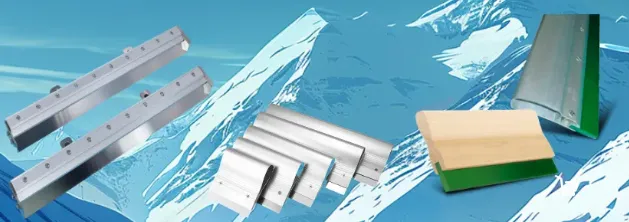
Squeegee Material: Stainless Steel vs. Polyurethane
The two common material categories are metal and polyurethane. Each offers different mechanical characteristics and suits different printing conditions.
Stainless Steel Squeegees
Stainless steel blades provide a rigid and stable contact edge. Their stiffness helps maintain consistent contact with the stencil and supports controlled solder paste deposition. They are widely used in production environments where repeatability and blade durability are important.
Metal squeegees can be particularly useful for fine-pitch printing because their rigid edges help reduce blade deformation during the printing stroke. However, damaged or improperly installed metal blades may scratch the stencil surface. Edge condition and installation accuracy therefore require regular attention.
Polyurethane Squeegees
Polyurethane blades are more flexible than metal alternatives. Their compliance can make them suitable for certain stencil configurations, specialized printing applications, and processes where a softer contact surface is preferred.
Their hardness affects how much the blade deforms under printing pressure. Softer blades may adapt more readily to surface variations, while harder blades provide greater resistance to deformation. However, excessive flexibility can affect paste control, especially when printing through small apertures.
When comparing materials, engineers should consider the required print consistency, stencil condition, component pitch, and maintenance requirements rather than assuming one material is suitable for every application.
Blade Hardness and Edge Condition
For polyurethane squeegees, hardness is commonly described using the Shore A durometer scale. A harder blade generally maintains a more stable profile under pressure, while a softer blade deforms more easily.
Blade hardness should be selected according to the printing setup and verified through print trials. The same hardness may produce different results depending on the solder paste, stencil, and machine settings.
Edge condition is equally important. Nicks, rounded sections, scratches, or uneven wear can cause inconsistent contact with the stencil. Even a suitable blade material may produce poor results when its working edge is damaged.
Squeegee Angle and Printing Pressure
The squeegee angle determines how the blade interacts with the stencil and solder paste. It influences the balance between paste rolling, downward force, and shearing action.
A commonly used starting point is an angle within approximately 45 to 60 degrees, although the appropriate setting depends on the printer and blade design. A smaller angle may increase the downward force, while a steeper angle changes the way the blade shears and moves the paste.
Printing pressure must be sufficient to maintain contact and remove excess paste from the stencil surface. Too much pressure can cause stencil wear, paste leakage, or deformation. Too little pressure may leave a residual paste film or contribute to incomplete aperture filling.
Rather than applying a universal pressure value, engineers should follow the printer manufacturer's guidance and adjust settings based on actual print inspection results.
Squeegee Length and Compatibility
The blade length should match the stencil and printer configuration. It needs to cover the intended printing area while maintaining stable pressure across its working edge.
A blade that is too short may leave part of the stencil uncovered. An excessively long or poorly supported blade may experience uneven pressure distribution, particularly when the mounting system is not designed for that configuration.
Before installation, verify blade dimensions, mounting compatibility, alignment, and the printer manufacturer's specifications.
Exploring Different Solder Paste Squeegee Designs for Stencil Printing
Beyond material composition, squeegees are engineered in various designs, each tailored to specific requirements within PCB assembly. Understanding these distinct types is key to fine-tuning the stencil printing process for consistent solder paste application.
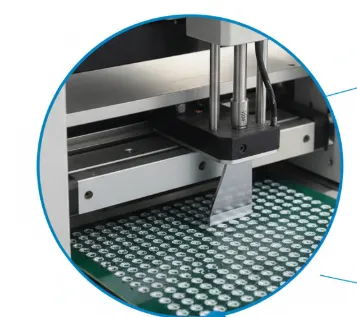
Flat Squeegees
Flat squeegees represent the most prevalent design, characterized by a straight, uniform edge. Their versatility makes them suitable for standard SMT applications, particularly those utilizing consistent stencil thicknesses (typically ranging from 0.1mm to 0.15mm). These squeegees deliver even pressure distribution and are straightforward to set up, establishing them as a default choice for many assemblers.
Diamond or Angled Squeegees
Featuring a distinct diamond or angled profile, these squeegees are engineered to enhance paste rolling dynamics and minimize the amount of solder paste residue left on the stencil following each pass. They prove particularly advantageous for high-density boards incorporating fine-pitch components, as their unique edge geometry facilitates more effective filling of minute apertures.
Trailing Edge Squeegees
Trailing edge squeegees incorporate a slight curve or a secondary edge that trails the primary contact point. This innovative design is aimed at further reducing paste residue on the stencil, thereby decreasing the frequency of cleaning cycles and promoting greater print consistency over extended production runs. For fine-pitch applications (below 0.5mm), exploring diamond or trailing edge squeegees can significantly improve aperture filling and help mitigate defects such as bridging.
View more about SMT stencils on: The Comprehensive Guide to SMT Stencil Engineering: From Design Optimization to Process Control
Best Practices for Optimizing Stencil Printing in PCB Assembly
While squeegee selection is foundational, achieving consistently high-quality solder paste application requires a holistic approach to the entire stencil printing process. Implementing the following strategies can significantly enhance your PCB assembly workflow and minimize defects.
Matching Squeegee to Stencil Thickness
The thickness of the stencil, typically between 0.08mm and 0.2mm, directly determines the volume of solder paste deposited. Thinner stencils (e.g., 0.08mm) are generally used for fine-pitch components to control paste volume, whereas thicker stencils (0.15mm to 0.2mm) are employed for larger components requiring more paste. A harder squeegee (higher durometer or metal) is recommended for thinner stencils to maintain control over small apertures, while a softer squeegee is better suited for thicker stencils to accommodate higher paste volumes without applying excessive pressure.
Controlling Print Speed
The speed at which the squeegee traverses the stencil critically affects paste consistency. A typical print speed ranges from 20 to 70 mm per second. Slower speeds (closer to 20 mm/s) generally allow for superior aperture filling in fine-pitch designs. Conversely, faster speeds (up to 70 mm/s) are often more efficient for larger components and quicker production cycles. It is advisable to conduct tests with varying speeds on your specific printer to identify the optimal setting for your unique setup.
Regular Maintenance and Cleaning
Squeegees, particularly those made of polyurethane, are subject to wear and tear, which can manifest as nicks or uneven edges over time. Regular inspection of the squeegee for signs of wear is crucial; any inconsistencies in the edge warrant replacement. Furthermore, cleaning the squeegee after each print cycle is imperative to remove residual paste, which can otherwise lead to inconsistent application. A lint-free cloth paired with an appropriate solvent should be used to maintain the blade's optimal condition.
Monitoring Solder Paste Properties
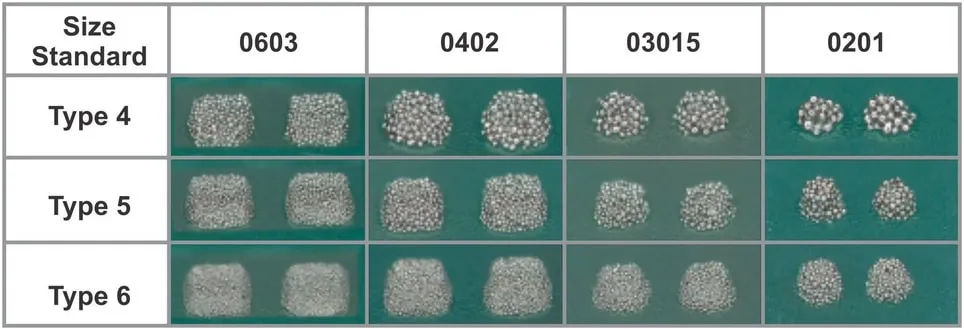
The viscosity and particle size of the solder paste profoundly influence squeegee performance. Pastes characterized by smaller particle sizes (e.g., Type 4 or Type 5, with particle diameters of 20-38 microns or 15-25 microns, respectively) are typically utilized for fine-pitch applications and necessitate a firmer squeegee to ensure proper transfer. Conversely, thicker pastes intended for larger components may perform better with a softer blade to prevent aperture clogging. Always adhere to the paste manufacturer's recommendations and adjust your squeegee choice accordingly to ensure compatibility and optimal results.
Common Squeegee-Related Solder Paste Printing Defects
Even with a meticulously configured setup, stencil printing can present various challenges. The appropriate squeegee selection, coupled with optimized settings, can effectively mitigate many common issues encountered in PCB assembly.
Resolving Insufficient Paste Deposition
When apertures fail to fill adequately, leading to insufficient paste deposition, consider adjusting the squeegee parameters. Switching to a softer polyurethane squeegee or modifying the contact angle to approximately 45 degrees can enhance paste rolling and facilitate better aperture filling. A slight increase in pressure, for instance, by 0.2 kg/cm , may also prove beneficial in ensuring complete paste transfer.
Preventing Solder Bridging
Solder bridging, characterized by excess paste linking adjacent pads, often stems from either excessive squeegee pressure or a worn blade edge. To counteract this, opt for a harder squeegee material or reduce the applied pressure to gain better control over the paste volume. This adjustment helps prevent paste from bleeding under the stencil and creating unwanted connections.
Mitigating Stencil Damage
Harsh metal squeegees or the application of excessive pressure can inflict scratches or dents on stencils, especially thinner ones. To minimize wear and tear on delicate stencils, it is advisable to choose a polyurethane squeegee with a moderate durometer rating (typically 70-80). This choice offers a balance between effective paste transfer and protection for the stencil, prolonging its lifespan and maintaining print quality.
How to Maintain Squeegee Performance in SMT Production
Squeegee maintenance helps preserve printing consistency and reduces the risk of defects caused by worn or contaminated blades.
A practical maintenance routine should include:
-
Before production: Check blade alignment, edge condition, mounting security, and stencil compatibility.
-
During production: Monitor paste rolling, printing consistency, and any unusual residue or streaking.
-
After printing: Remove solder paste residue using compatible cleaning materials and inspect the blade.
-
At regular intervals: Evaluate blade wear and replace blades when their edges no longer provide reliable contact.
For production environments, maintenance records can help identify recurring blade-related issues. Tracking blade usage, cleaning frequency, replacement history, and print inspection results makes it easier to determine whether inconsistent deposits are related to tooling or other process variables.
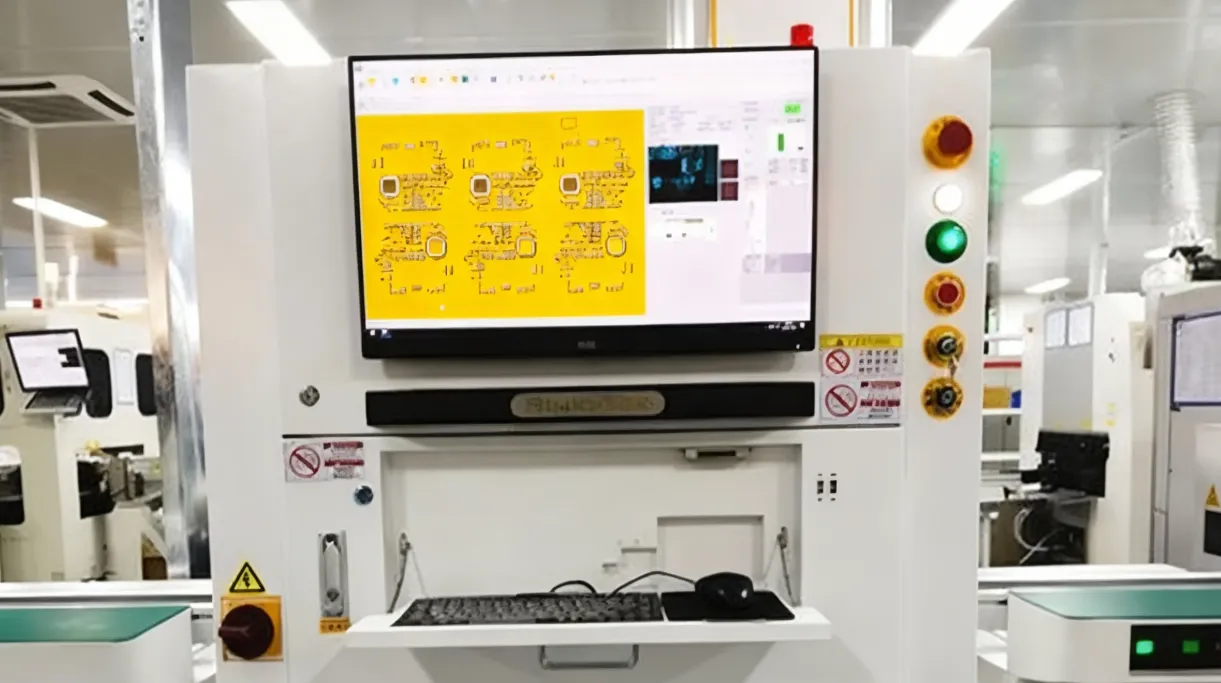
Automated inspection can provide additional feedback. Solder Paste Inspection (SPI) systems evaluate printed paste deposits for characteristics such as volume, height, and alignment. These measurements help engineers identify variations early, before component placement and reflow soldering.
Conclusion
Choosing the right solder paste squeegee is essential for maintaining consistent stencil printing and reliable PCB assembly. Blade material, hardness, geometry, edge condition, printing angle, and pressure all influence how solder paste transfers from the stencil to PCB pads.
Stainless steel and polyurethane blades each have their own applications, while flat, angled, and trailing-edge designs offer different printing characteristics. The best selection depends on the PCB layout, stencil specifications, solder paste properties, and production requirements.
By combining appropriate squeegee selection with controlled printing parameters, regular maintenance, and SPI inspection, manufacturers can improve paste deposition consistency and reduce common SMT printing defects.
FAQs
Q1: How often should a solder paste squeegee blade be replaced?
A1: There is no universal replacement interval for a solder paste squeegee blade. Its service life depends on blade material, printing frequency, cleaning practices, solder paste characteristics, and operating conditions. Inspect the working edge regularly and replace the blade when visible wear, deformation, or inconsistent printing performance affects paste deposition.
Q2: Can the same squeegee blade be used with different solder paste types?
A2: A squeegee blade may be compatible with multiple solder paste formulations, but compatibility should be verified for each printing process. Different pastes have different rheological properties and particle characteristics, which can affect rolling behavior and aperture filling. Clean the blade properly when changing materials and validate the new setup through print inspection.
Q3: What should be checked when installing a replacement squeegee blade?
A3: Before using a replacement blade, check its length, thickness, profile, mounting compatibility, and working-edge condition. Confirm that it is securely installed and aligned with the stencil. A printing trial should be performed to verify consistent paste deposition before proceeding with regular production.
Q4: How should solder paste squeegee blades be stored when not in use?
A4: Clean the blade using materials compatible with its construction, remove residual solder paste, and dry it according to the manufacturer's instructions. Store it in a clean, dry location with suitable protection for the working edge. Avoid stacking blades in a way that could cause scratches, bending, or deformation.